UGC video on Shopify: rights, formats and where to place it
Before a customer's or creator's video goes on your Shopify store, you need written permission, a file Shopify accepts and a spot on the page where it answers a question. What Instagram, TikTok and the FTC say, Shopify's video limits, and where each clip fits.
To use UGC video on Shopify, you need three things: written permission from the person who filmed the clip, a file Shopify accepts (MP4, MOV or WebM, up to 1 GB and 10 minutes), and a place on your store where the clip answers a shopper's question, usually the product page. A video posted on Instagram or TikTok still belongs to the person who posted it, and paying a creator does not transfer ownership either.
Every rule below was checked on the Instagram, TikTok, FTC, U.S. Copyright Office and Shopify pages on 1 October 2026.
Who owns a UGC video
UGC (user-generated content) is video filmed by customers or creators, not by your brand. Who owns it depends on where it came from.
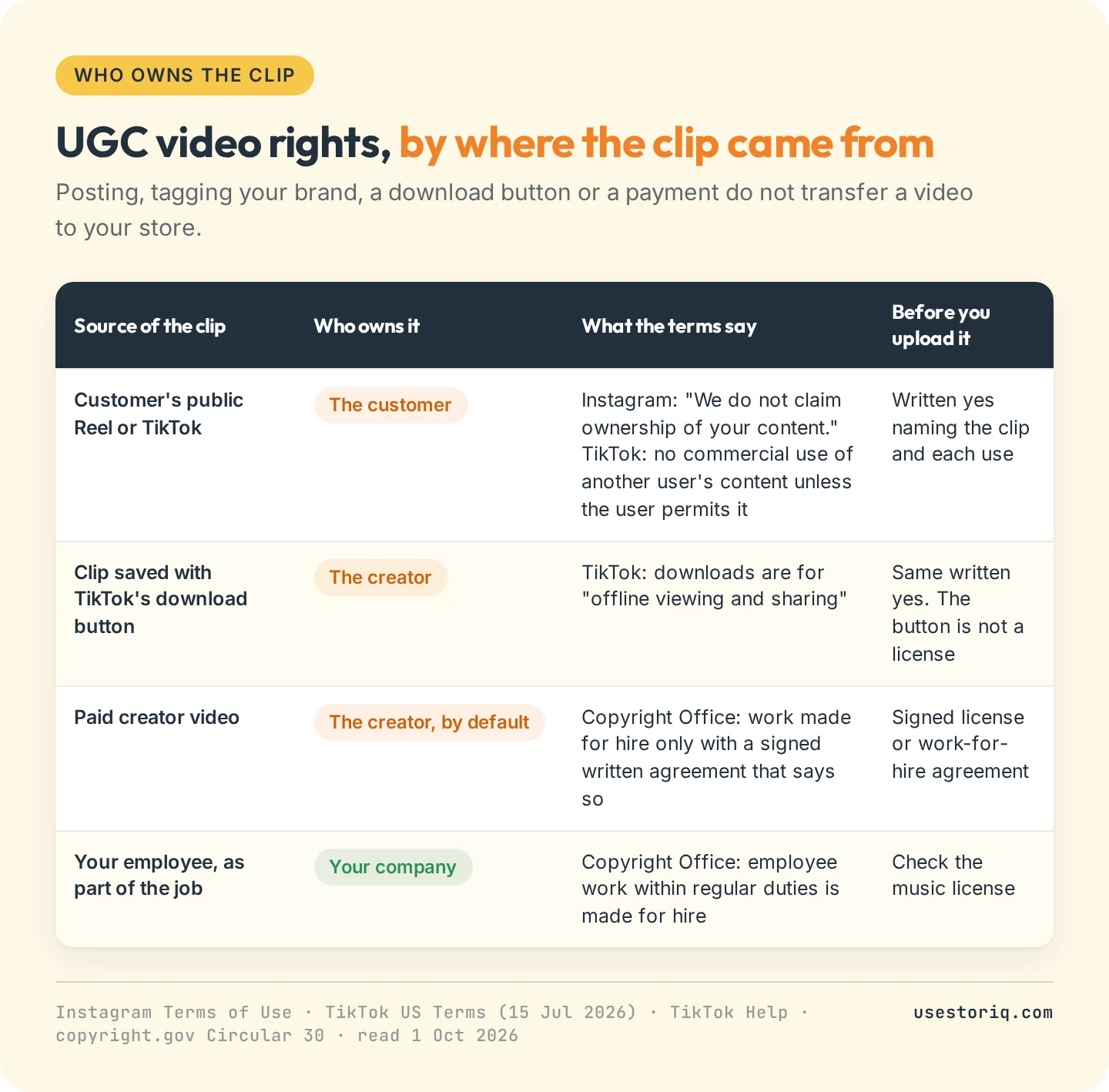
A customer's Reel or TikTok. Instagram's Terms of Use state: "We do not claim ownership of your content." The license users grant goes to Instagram, not to your store. TikTok's US Terms of Service, last updated on 15 July 2026, say users own their content and forbid using "another user's content" for commercial purposes unless the user permits it. A tag of your brand in the caption is not that permission.
A downloaded clip. TikTok's help center describes downloads as saving videos "for offline viewing and sharing". The Save video button means the creator allows downloads, not that you may use the clip on a product page.
A paid creator. The U.S. Copyright Office's circular on works made for hire explains that the author is ordinarily the person who created the work. A commissioned video counts as a work made for hire only when both parties sign a written agreement that expressly says so. Without one, the creator keeps the copyright and you need a license.
Your own team. A video an employee films as part of their regular duties is a work made for hire, so your company owns it.
How to get usage rights for UGC video
For a customer's post, a direct message works: ask, wait for a written yes, and screenshot it. For creators, put the same points in the contract. Shopify's own guide to UGC advises getting permission "in writing" and being "specific about where and how you plan to use the content".
What the permission should cover
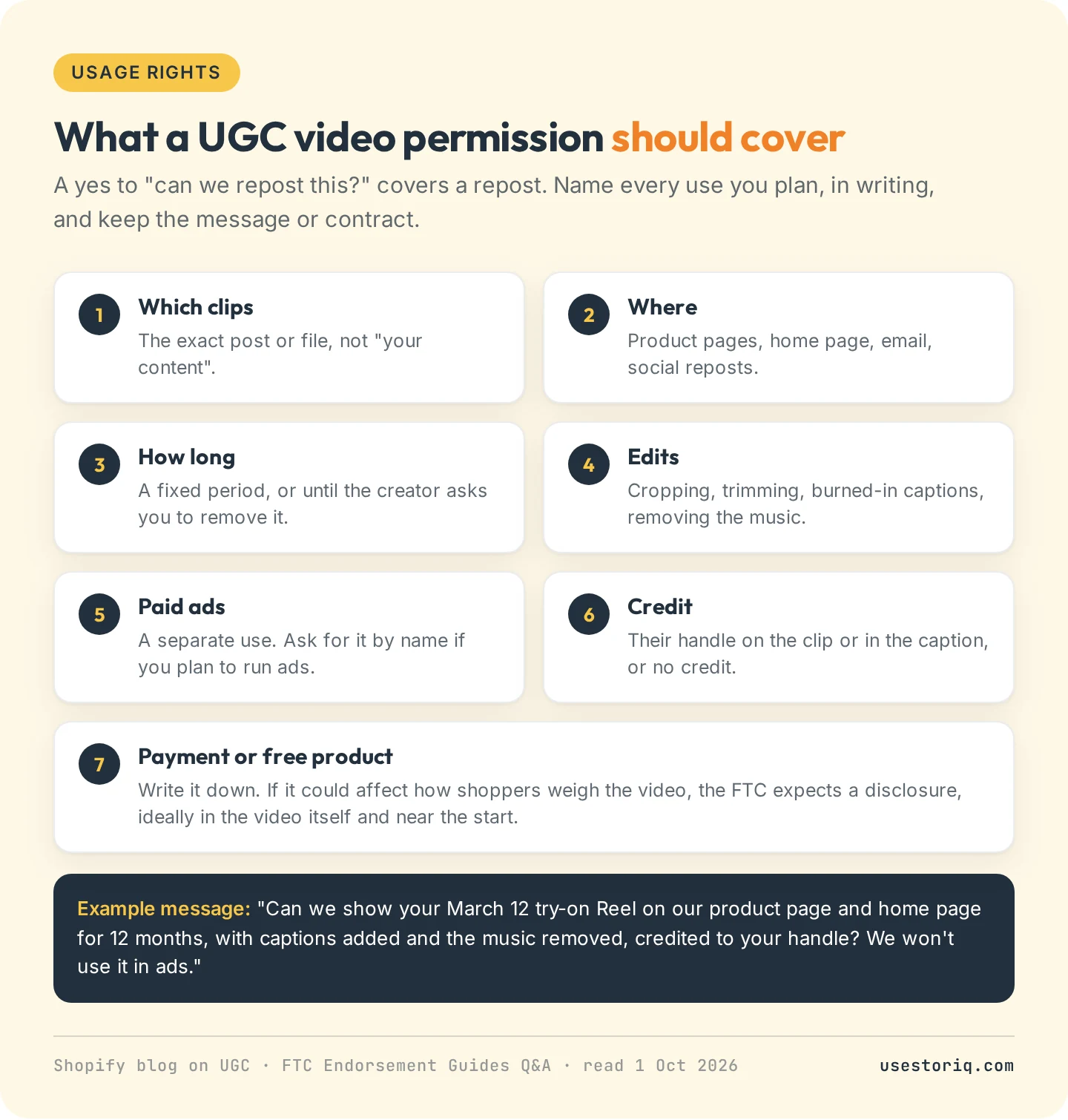
A yes to "can we repost this?" covers a repost. Name each use (product pages, home page, email), the duration, the edits you plan (crop, captions, trimming, removing the music) and whether you will credit the creator by handle. Paid ads are a separate use: ask for them by name.
Music inside the clip
The creator owns the footage, not the soundtrack. Instagram's and TikTok's music libraries are licensed for use on those platforms, and our guide to adding Instagram Reels and TikTok videos to Shopify quotes both sets of terms. Ask for a version without the track, or replace it with audio you have licensed.
Disclosure rules for creator and customer videos
The FTC's Endorsement Guides Q&A sets the test: disclose a free product or payment when knowing about it "would affect the weight or credibility" viewers give the recommendation. For video, it adds:
- The disclosure has the best chance of being clear when it is "included in the video itself", not only in a caption.
- A disclosure at the beginning beats one at the end, because "some may not watch the whole thing".
- If the creator claims a result, you need proof that it is typical, or the page must state what shoppers can generally expect.
The brand stays responsible. The FTC tells companies that hand social media to an agency: "Your company is ultimately responsible for what others do on your behalf."
The FTC's Consumer Reviews and Testimonials Rule (16 CFR Part 465, in effect since 21 October 2024) adds two limits. You can offer an incentive for a video review, as long as it does not require a positive one. Its review suppression provision covers the part of your site dedicated to reviews: picking your best customer clips for a product page section is not banned by this rule, but hiding negative reviews in your reviews section can be.
UGC video formats Shopify accepts
Every UGC video on Shopify goes through the same file requirements, whether it ends up as product media, in a theme section or in an app that stores files in Shopify.
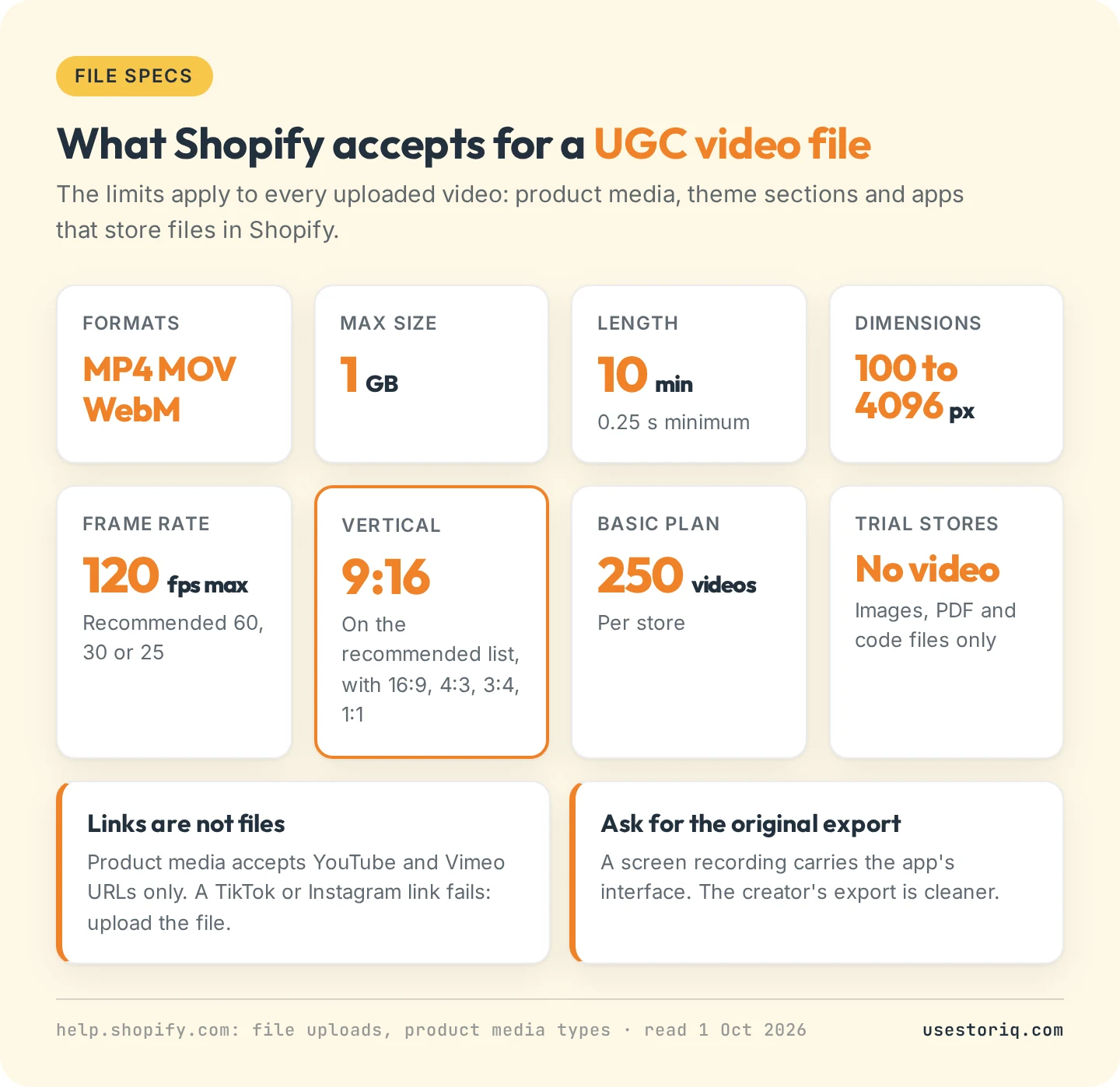
- Formats: MP4, MOV and WebM.
- Size and length: up to 1 GB and 10 minutes, at least 0.25 seconds.
- Dimensions: 100 to 4096 pixels on each side, up to 120 frames per second. Shopify recommends 60, 30 or 25 fps.
- Aspect ratio: 9:16 is on Shopify's recommended list, with 16:9, 4:3, 3:4 and 1:1, so a vertical clip from Reels or TikTok needs no reframing.
- Store limits: 250 videos on the Basic plan. Trial stores cannot upload video files.
Two traps are specific to UGC. A link is not a file: product media accepts YouTube and Vimeo URLs only, so a TikTok or Instagram link fails. Ask the creator for the original export rather than a screen recording, which picks up the app's interface. Then plan for silence. Browsers block autoplay with sound until the visitor interacts with the page, so clips that start on their own play muted. Burn in captions wherever the words matter. Our page on Shopify product video size lists export settings, and the TikTok guide covers getting the file out of the app.
Where to place UGC video on your Shopify store
Place each clip where its question comes up. A try-on clip answers "how does it fit" on the product page. An unboxing or a haul shows the brand on the home page.
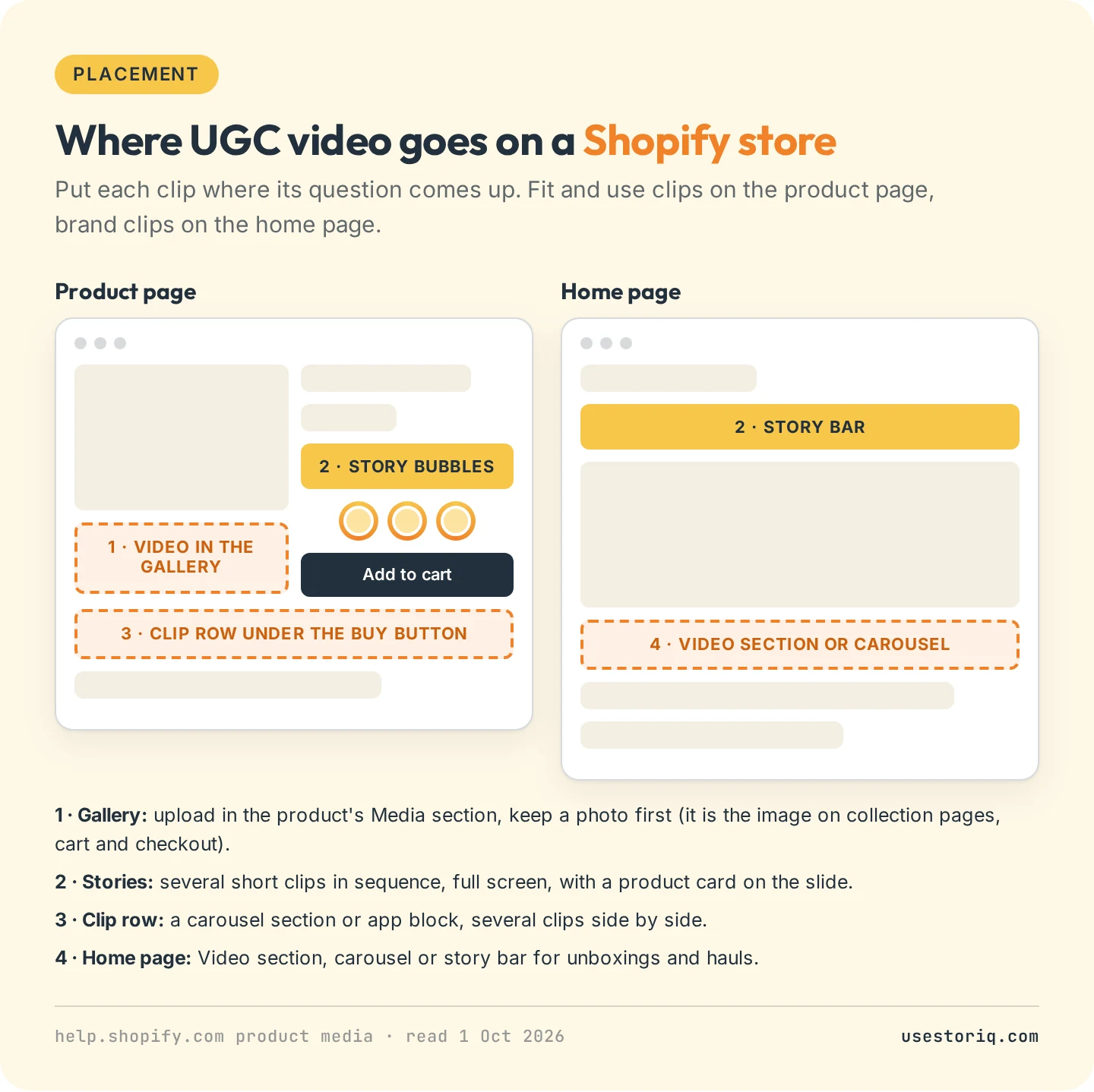
In the product gallery. Upload the clip in the product's Media section and keep a photo in first position: the first media item is the image used on collection pages, in the cart and at checkout. Our guide to adding video to a Shopify product page shows how themes play gallery videos.
As stories on the product page. Short customer clips play one after another, full screen, from bubbles near the buy button, and a slide can carry a product card. The page on shoppable stories explains the format.
In a row under the buy button. A carousel shows several clips side by side. The Shopify video carousel guide covers the theme section, the code and the apps.
On the home page. A Video section, a carousel or a story bar. See video on your Shopify homepage for autoplay and page weight.
To show a public post as it is, without uploading it, use the platform's embed: our guide to embedding an Instagram Reel on Shopify shows how. For apps that also collect UGC from customers, see our comparison of shoppable video apps for Shopify.
UGC clips as stories with Storiq
Storiq shows the clips you already have rights to as stories on your store. It does not collect UGC or request rights from creators: you upload the files, they land in your Shopify Files library under the limits above, and you target each story to a product, a collection or the whole store. The Free plan runs 3 active stories and 1,000 story views a month on product pages. Product cards with the price read live from your catalog, scheduled stories and home and collection placements start on Starter at $9.99 a month, with a 7-day free trial.
Frequently asked questions
Can I put a customer's video on my Shopify store?
Yes, with the customer's permission. Posting a video on Instagram or TikTok leaves its owner in control: Instagram's terms say it does not claim ownership of users' content, and TikTok's terms forbid using another user's content for commercial purposes unless that user allows it. Get a written yes that names the clip and where you will use it, and keep it.
Do I own a UGC video if I paid the creator?
Not by default. Under US copyright law, the person who films a video is ordinarily its author and owner. A commissioned video becomes a work made for hire only if both parties sign a written agreement that says so. Otherwise, get a written license that lists where, how long and how you may use the clips.
What video format does Shopify accept?
Shopify accepts MP4, MOV and WebM files up to 1 GB and 10 minutes, at up to 4096 pixels on each side and 120 frames per second. Shopify recommends 9:16 among its aspect ratios, so vertical clips from Reels or TikTok upload as they are. Stores on a trial plan cannot upload video files.
Do I have to disclose that a creator was paid for a video on my store?
Yes, if the payment or free product could affect how much weight shoppers give the video. The FTC says a disclosure has the best chance of being clear when it is in the video itself, and that one at the beginning is better than one at the end.