How to embed an Instagram Reel on Shopify without an app
Copy the Reel's embed code on instagram.com, paste it into a Custom Liquid section or a page's HTML view, and size it for desktop and phones. The code, what shoppers see when they tap, and fixes for a blank embed.
To embed an Instagram Reel on Shopify without an app, open the Reel on instagram.com in a browser, click the three-dot menu, choose Embed and copy the code. In your Shopify admin, go to Online Store > Themes > Customize, add a Custom Liquid section where the Reel should appear, paste the code and save. For a page or a blog post, paste it in the editor's Show HTML view instead. The account has to be public, with its Embeds setting on.
The procedure is free. Whether the Reel looks right depends on the code, its width, what a tap does and why it sometimes shows up blank. We tested each point on 1 October 2026 with a public Reel in Chromium, at desktop and phone sizes, with the CSS of Shopify's Dawn theme. If you are still choosing how to add Instagram Reels to Shopify (embed, feed app or upload), start with our guide to adding Instagram Reels and TikTok videos to Shopify.
Before you start: how to get Instagram Reels to embed
Instagram's help center on embeds sets three conditions: Reels from private accounts can't be embedded, the Instagram app doesn't give embed codes (use a computer or mobile browser), and a public account can turn its Embeds setting off. A missing Embed option means one of these applies.
On a computer, the setting sits under More > Settings > Sharing and reuse > Website embeds, per Instagram's page on turning embeds off. Check it before you paste a creator's or a customer's Reel: they can switch it off at any time, and your embed stops showing.
On desktop, the three-dot menu is at the top right of the Reel, next to the account name. The same code works to embed an Instagram Reel on any website; only where you paste it is specific to Shopify.
How to embed an Instagram Reel on Shopify, step by step
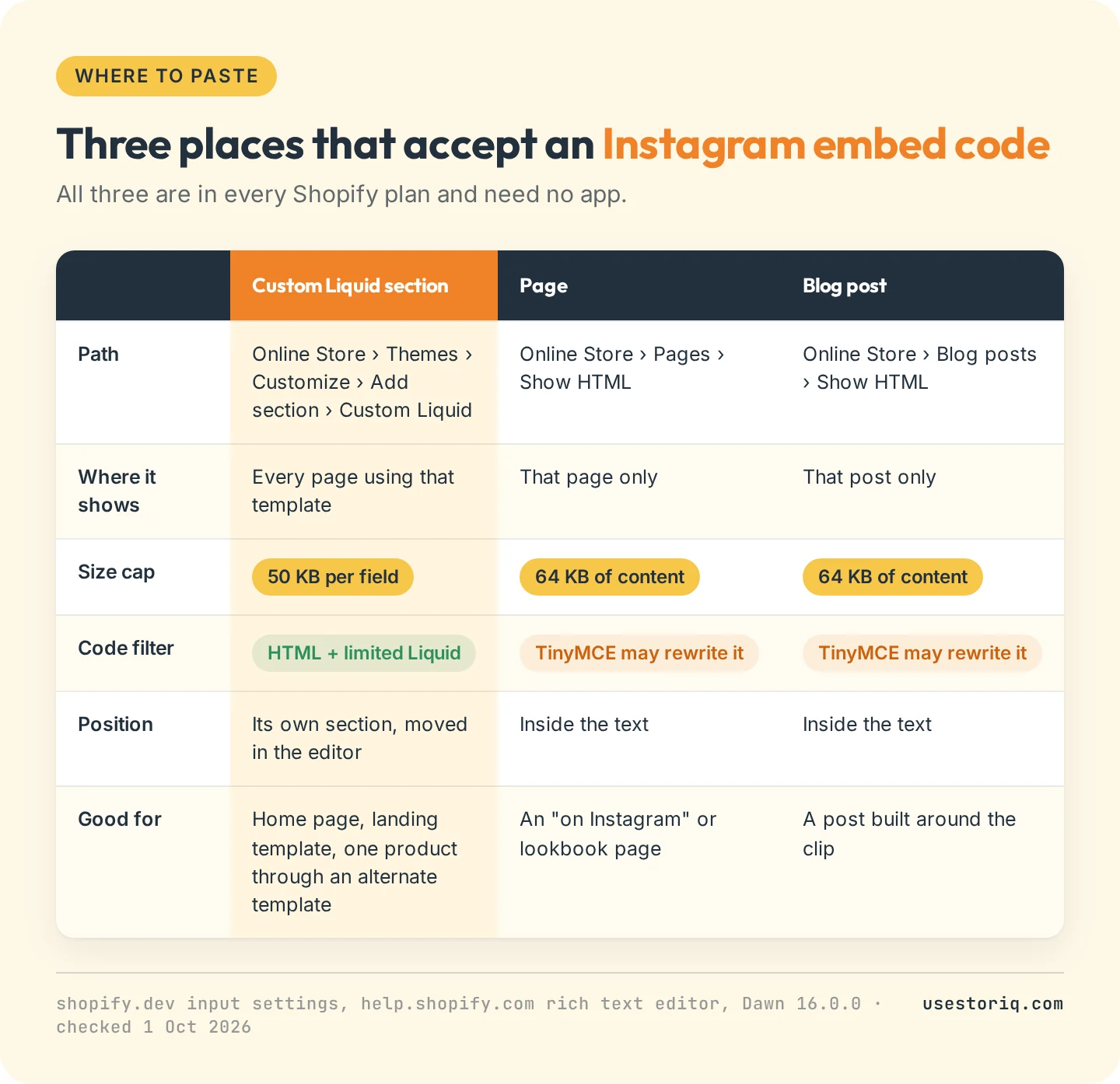
In a theme template, with a Custom Liquid section
- In your admin, go to Online Store > Themes and click Customize.
- Pick the template in the top menu: home page, a product template, a page template.
- Click Add section and choose Custom Liquid.
- Paste the code into the Liquid code field and click Save.
The section shows on every page that uses the template. To show a Reel on one product only, create an alternate product template, add the section there and assign that template to the product. The field holds 50 KB at most, per Shopify's developer docs on theme settings. The short code below weighs 446 bytes.
In a page or a blog post
Open the page (Online Store > Pages) or the post (Online Store > Blog posts), click Show HTML in the editor, paste the code where the Reel belongs and save. Shopify's rich text editor guide gives the same steps for media embed codes, and sets two limits: 64 KB of content per page or post, and a TinyMCE filter that "automatically corrects HTML formatting". If the live page shows only a link where the Reel should be, open Show HTML again and check that the <script> line survived.
The minimal embed code and how to size it
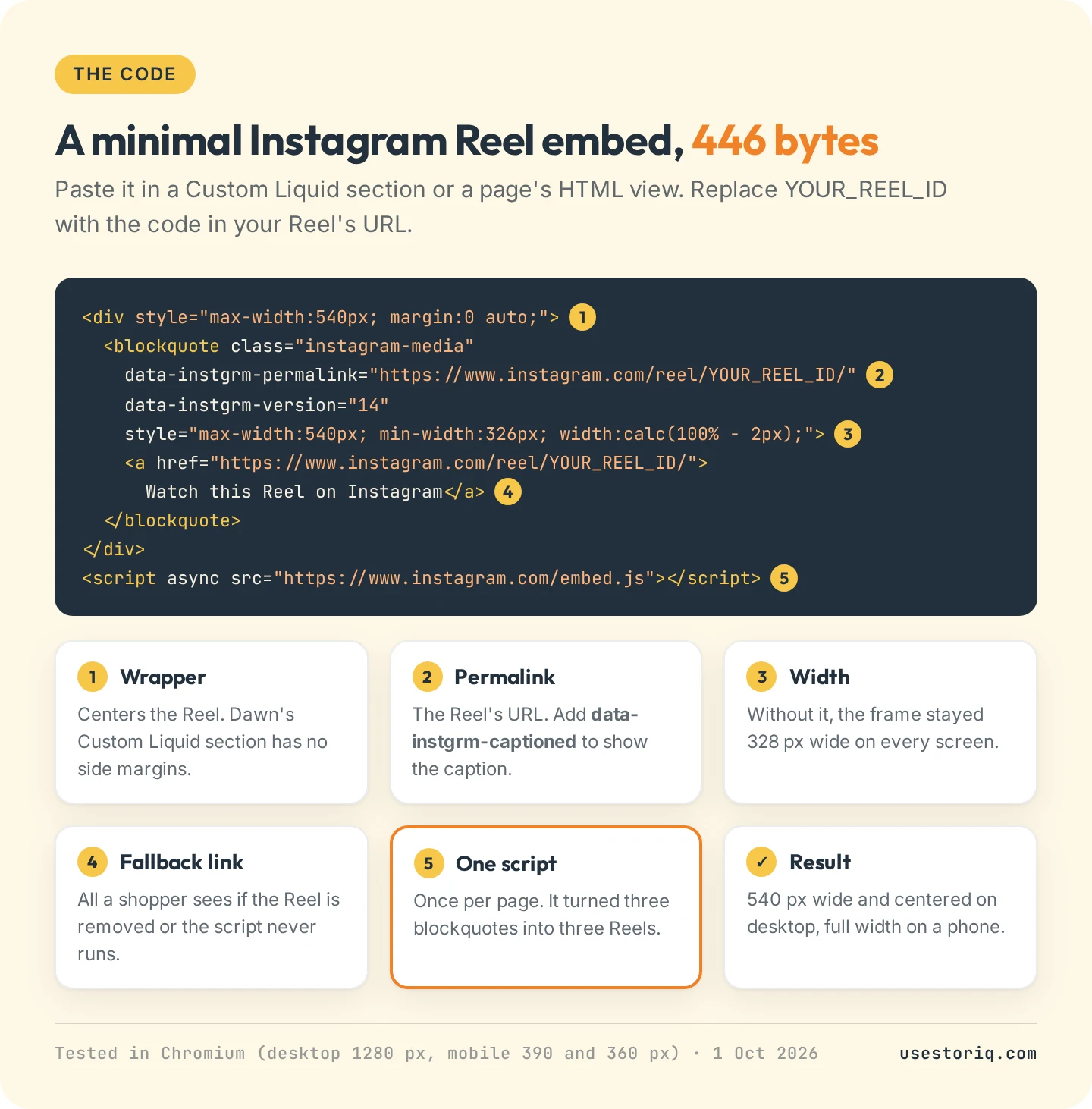
The code has two parts. A blockquote holds the Reel's address and a fallback link, and a script tag loads Instagram's embed.js, which swaps the blockquote for an iframe that plays the Reel. This is the shortest version that rendered in our test, with a wrapper that fixes the layout in Dawn:
<div style="max-width:540px; margin:0 auto;">
  <blockquote class="instagram-media"
    data-instgrm-permalink="https://www.instagram.com/reel/YOUR_REEL_ID/"
    data-instgrm-version="14"
    style="max-width:540px; min-width:326px; width:calc(100% - 2px);">
    <a href="https://www.instagram.com/reel/YOUR_REEL_ID/">
      Watch this Reel on Instagram</a>
  </blockquote>
</div>
<script async src="https://www.instagram.com/embed.js"></script>
Replace YOUR_REEL_ID with the characters after /reel/ in the Reel's address. For several Reels, repeat the blockquote and keep one script line: in our test, one script rendered three Reels.
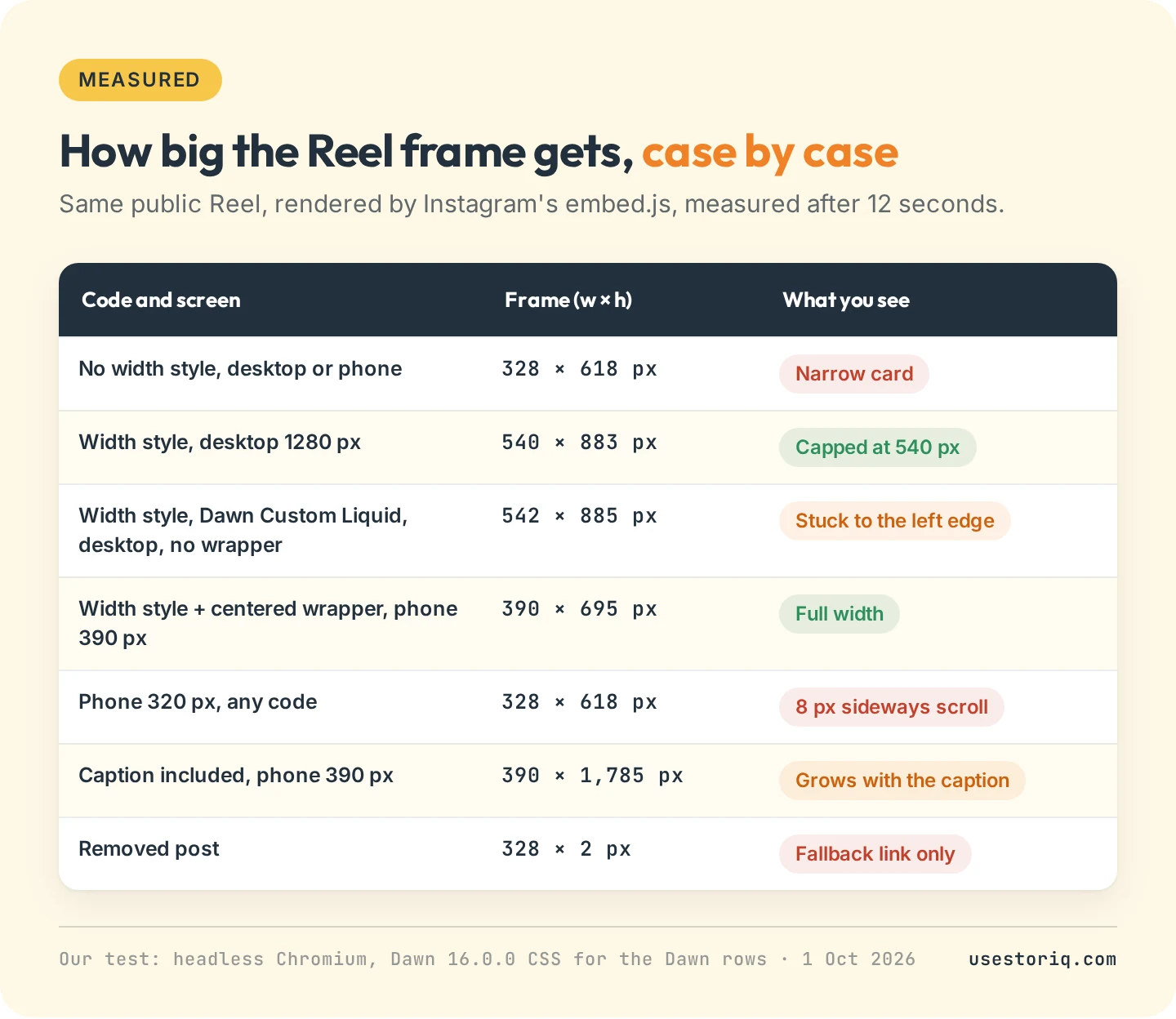
What we measured:
- Keep the width style. Without it, the frame stayed 328 px wide on every screen. With it, the Reel filled a 390 px phone and stopped at 540 px on desktop.
- Center it yourself in Dawn. Dawn's Custom Liquid section adds top and bottom padding but no side margins, so on desktop the Reel sat against the left edge of the window. The wrapper div centers it.
- Mind the 326 px floor. The frame never gets narrower than that. On a 320 px screen that meant 8 px of sideways scroll, so skip side padding and narrow columns.
- Expect a tall block. About 883 px high on desktop, 695 px on a 390 px phone. If your code contains
data-instgrm-captioned, the caption shows too: our test Reel then reached 1,785 px on the phone.
What shoppers see and where a tap goes
The Reel doesn't autoplay. Shoppers see a poster image with a play button, the account name and a View profile button above it, and like, comment, share and save icons below. A tap on the video played it in place, with sound, on desktop and at phone size.
Everything else in the frame is a link. Our test Reel had 14, from the account names to View more on Instagram, all opening instagram.com in a new tab. There is no product tag and no price: a shopper who wants the item scrolls back to your buy button.
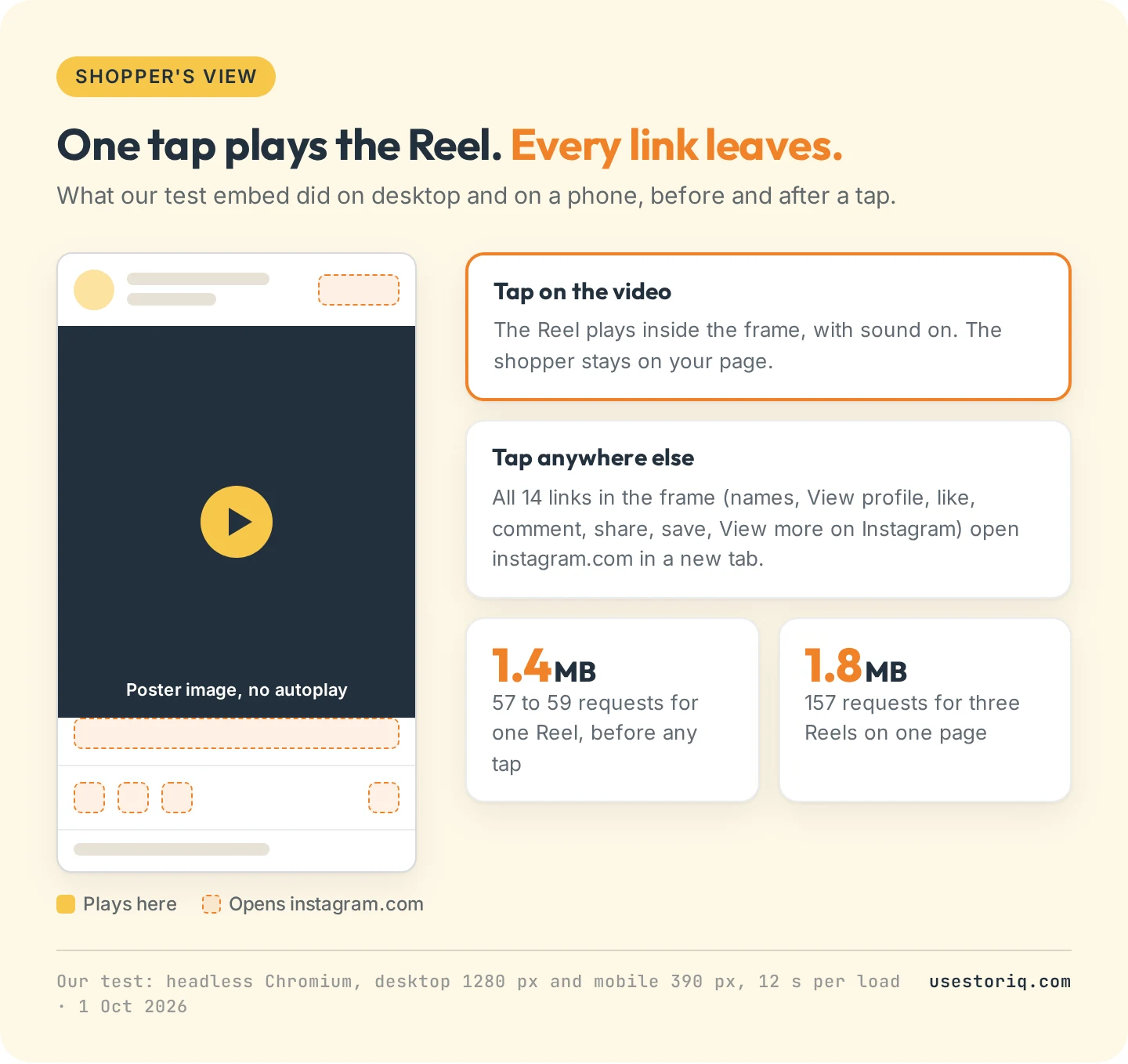
One Reel made 57 to 59 requests and transferred about 1.4 MB before any tap, 0.93 MB of it scripts. Three Reels came to 157 requests and 1.8 MB, because the scripts load once. If the Reel goes on your home page, our guide to Shopify homepage video covers keeping that page fast.
Instagram Reel embed not working: causes and fixes
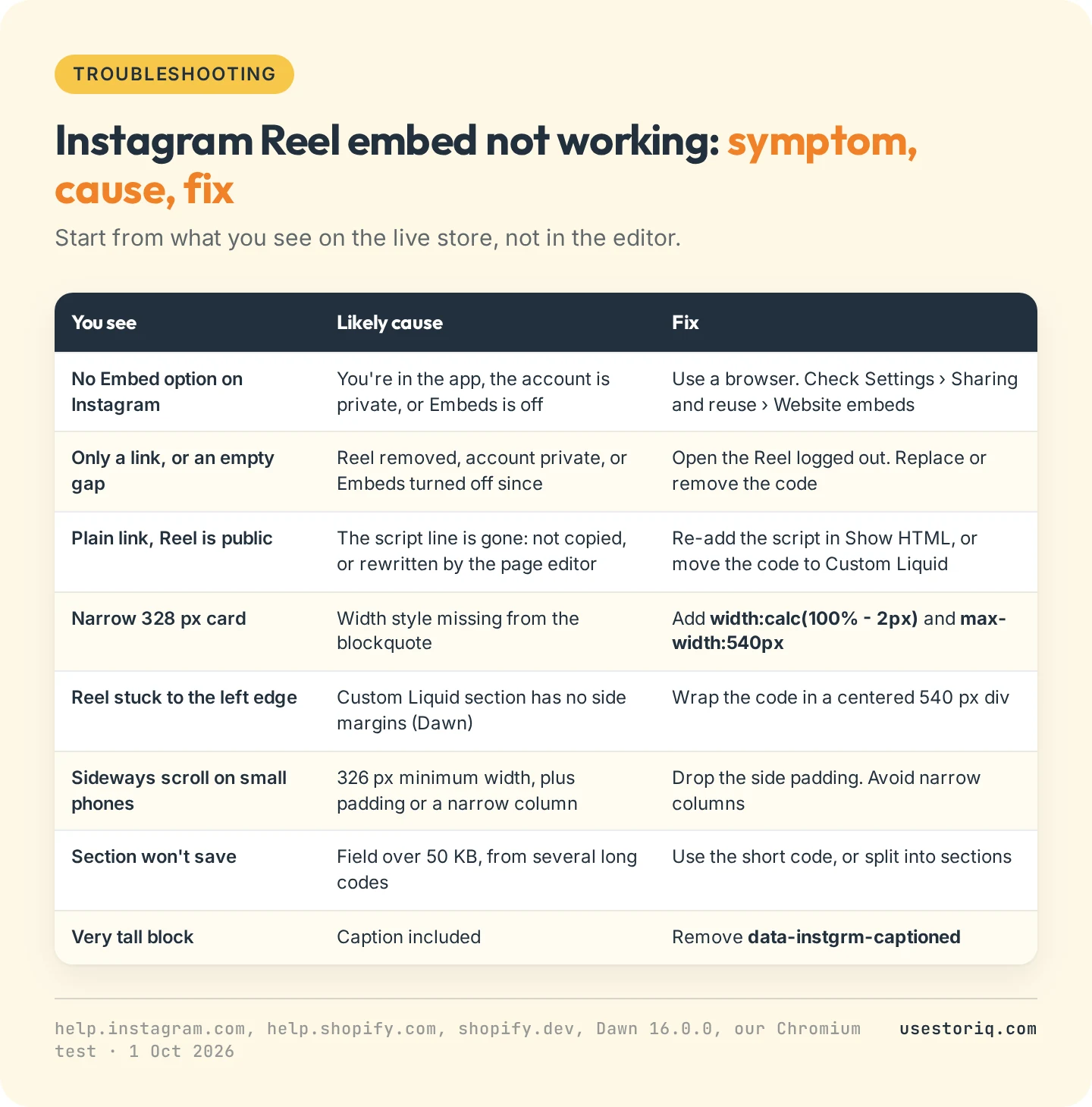
- An empty gap or a lone link. The Reel was removed, the account went private, or its owner turned embeds off. With the code of a Reel that is no longer available, Instagram's frame read "The link to this photo or video may be broken, or the post may have been removed" and embed.js shrank it to 2 px, leaving only the fallback link. Instagram warns that embeds "may take time to be removed" after the setting changes, so a Reel can vanish after you last checked it.
- A link only, on a public Reel. The script line is missing or was rewritten by the page editor. Restore it in Show HTML, or use a Custom Liquid section.
- The section won't save. The field is over 50 KB. Use the short code or split the Reels across sections.
When an embed is the wrong tool
An embed suits a lookbook page or a blog post that shows a product in use. It is the wrong tool when the Reel has to sell: it can't carry a product card, and most taps lead to Instagram. For that, save the original clip and upload it to Shopify, as product media or as a story with a product card, as described in the upload section of our guide to Instagram Reels and TikToks on Shopify. For a grid of Reels that updates itself, a feed app does the syncing, and our comparison of shoppable video apps for Shopify lists their prices and free plans as of October 2026.
Storiq is our app for the story route. It adds story bubbles and a full-screen viewer through a theme app block, with no code to paste. It does not connect to Instagram: you upload the clip you posted as a Reel, and it lands in your Shopify Files library. A slide can carry a tappable product card with the image, title and price read live from your catalog, so the tap leads to the product. The Free plan covers 3 active stories and 1,000 story views a month on product pages, and product cards start on Starter at $9.99 a month, with a 7-day free trial. Our page on shoppable stories explains how the format differs from an embedded Instagram feed.
Frequently asked questions
How do I get an Instagram Reel to embed?
The account must be public and its Embeds setting must be on. Open the Reel on instagram.com in a computer or mobile browser, click the three-dot menu, choose Embed and copy the code. The Instagram app does not give embed codes.
Why is my Instagram Reel embed not working on Shopify?
If you see only a link or an empty gap, the Reel was removed, the account went private, or its owner turned embeds off. If the Reel is public, the script line of the code is probably missing: open the page's Show HTML view and check it, or paste the code in a Custom Liquid section instead.
Can Shopify integrate with Instagram?
Yes, through Meta's Facebook & Instagram app, but it syncs your products to an Instagram shop and runs ads. It does not show Reels on your store. For that you need an embed code, a feed app, or to upload the clip yourself.
How do I add an Instagram link to my Shopify store?
In Dawn, open Online Store > Themes > Customize, go to Theme settings > Social media and paste your profile URL in the Instagram field. The icon then shows in the footer when its Social media icons setting is on. Other themes have their own social media settings.