How to add TikTok videos to your Shopify store
Embed a TikTok with its code, install a TikTok feed app, or upload the clip to Shopify. What each one shows shoppers, what it costs, and why the official TikTok app for Shopify does something else.

There are three ways to add TikTok videos to your Shopify store. Paste the video's embed code into a Custom Liquid section or a page. Install a TikTok feed app that syncs your account into a grid or slider. Or save the clip and upload it to Shopify, as product media or as a story with a product card.
The official TikTok app for Shopify does something else: it sends your products, and in the US your Shopify product videos, out to TikTok. We checked TikTok's and Shopify's documentation and the App Store listings on 1 October 2026, and tested the TikTok embed in Chromium the same day. For the Instagram side and a side-by-side of the three methods, see our guide to adding Instagram Reels and TikTok videos to Shopify.
Can Shopify integrate with TikTok?
Yes. The TikTok app by TikTok Inc. is rated 4.8 from 15,991 reviews and is free to install, with ad spend billed to your TikTok ad account. Its listing describes TikTok ads, the TikTok Pixel, syncing products to TikTok Shop and managing TikTok Shop orders in Shopify.
Its video feature points toward TikTok too. TikTok's seller guide to auto-posting Shoppable Videos from Shopify, dated April 2026 and marked for the United States, explains that the app scans your store for product videos and publishes them to your TikTok account, 1 to 5 a day at 12:00 PM (GMT-8) by default, for products live on TikTok Shop and in stock.
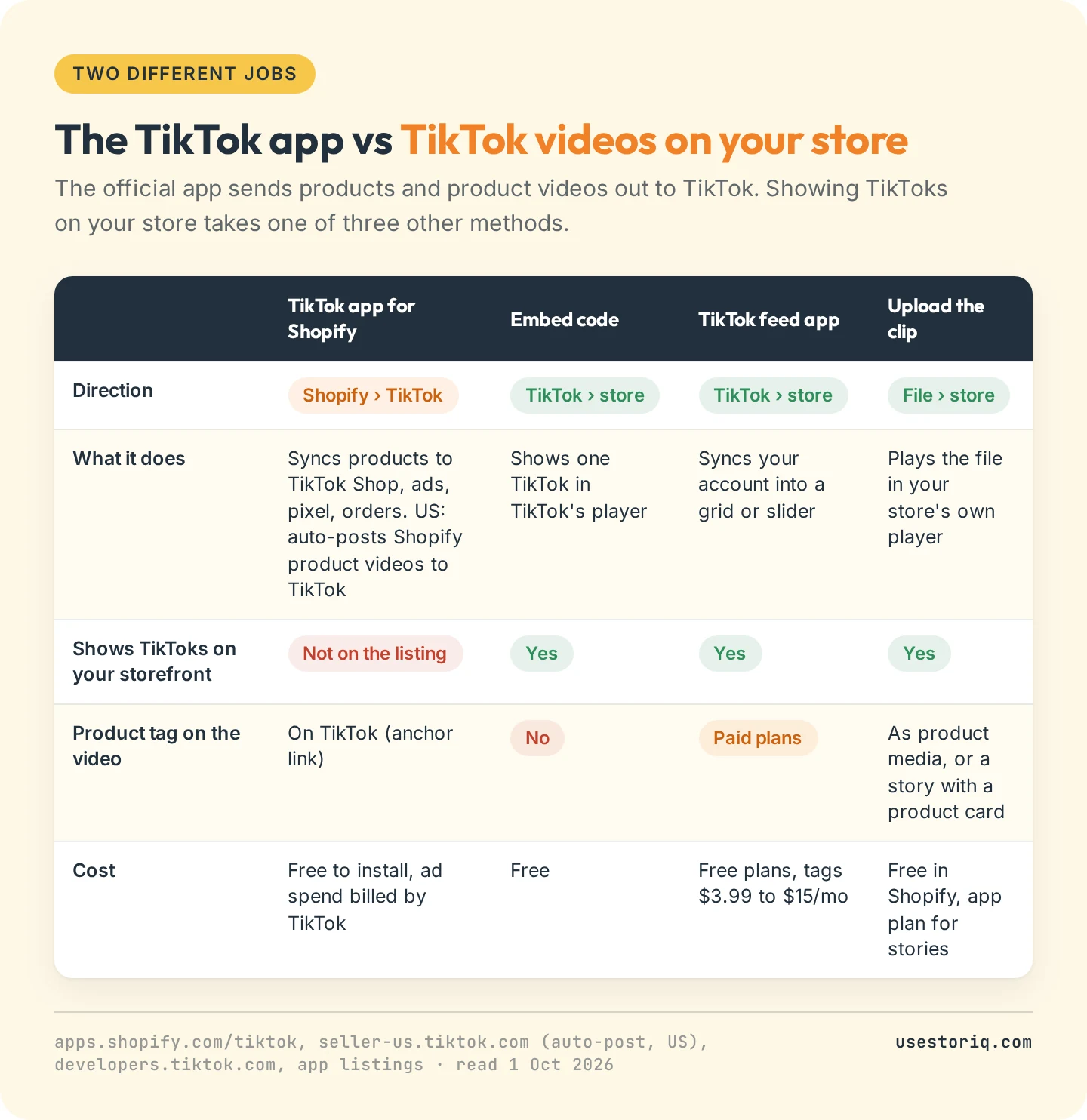
Most answers on how to add TikTok to Shopify start with this app. If you installed it hoping your TikToks would appear on your product pages, your setup is fine: showing TikTok videos on Shopify takes one of the three methods below.
How to embed a TikTok video in Shopify
Copy the embed code
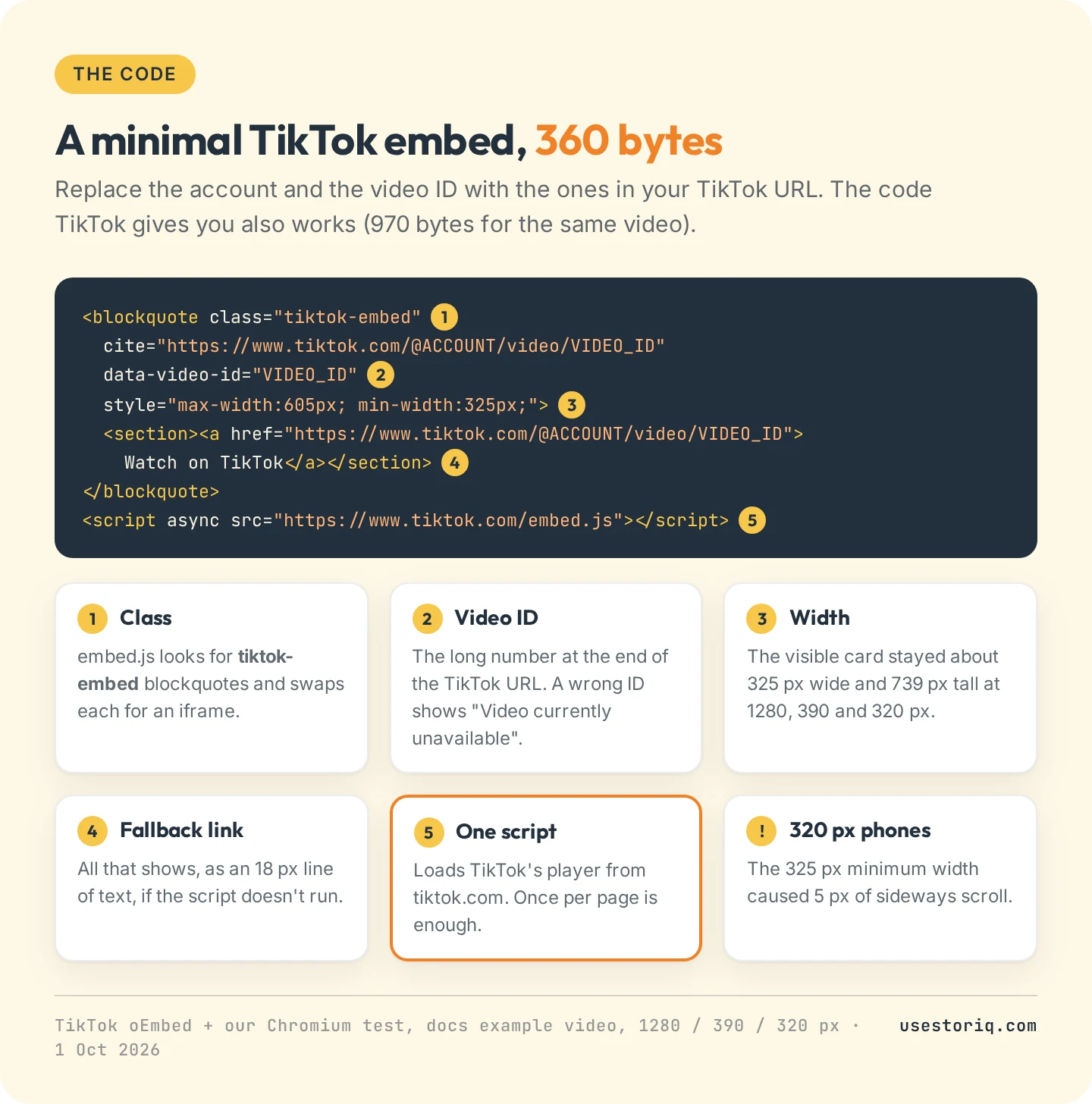
Open the video on tiktok.com from a computer, click Share, then Embed, and copy the code. TikTok's embed documentation says the page must be opened "from a non-mobile surface", so the app won't offer it.
The code is a blockquote with the class tiktok-embed and the video's ID, followed by a script that loads embed.js from tiktok.com. For TikTok's example video, the code from TikTok's oEmbed endpoint weighed 970 bytes, mostly caption and hashtag links that the player replaces. A 360-byte version worked the same in our test.
Paste it into a Custom Liquid section or a page
The steps match those in our guide to embedding an Instagram Reel on Shopify: Online Store > Themes > Customize, pick the template, Add section > Custom Liquid, paste, save. The field holds 50 KB, and a page or blog post (via Show HTML) 64 KB, so one TikTok code fits dozens of times. You don't need Edit code, where older tutorials still send you.
In a product description, the video lands inside the text, and in Shopify's Dawn theme the description sits below the buy buttons.
What shoppers see
In our test, TikTok's player centered itself, and the visible card stayed about 325 px wide and 739 px tall on a 1280 px desktop and on 390 px and 320 px phones. On the 320 px screen, that minimum width caused 5 px of sideways scroll.
The card's 12 links all open www.tiktok.com in a new tab. TikTok's documentation adds that the player shows recommended videos after each playback, chosen by TikTok, and that Discover more on TikTok sends mobile visitors to the App Store or Google Play. There is no product tag.
The embed is also heavy. For our Reels and TikTok guide, we loaded one TikTok embed four times: 60 to 61 requests and 3.5 to 7.7 MB before any click, about 1.1 MB of it scripts. The player started loading the video, muted, before anyone pressed play. Read our notes on Shopify homepage video before putting several on a home page.
TikTok feed apps for Shopify, October 2026
A TikTok feed app connects to your account and shows your videos as a grid or slider, adding new posts automatically. These are the TikTok feed Shopify app options we checked:
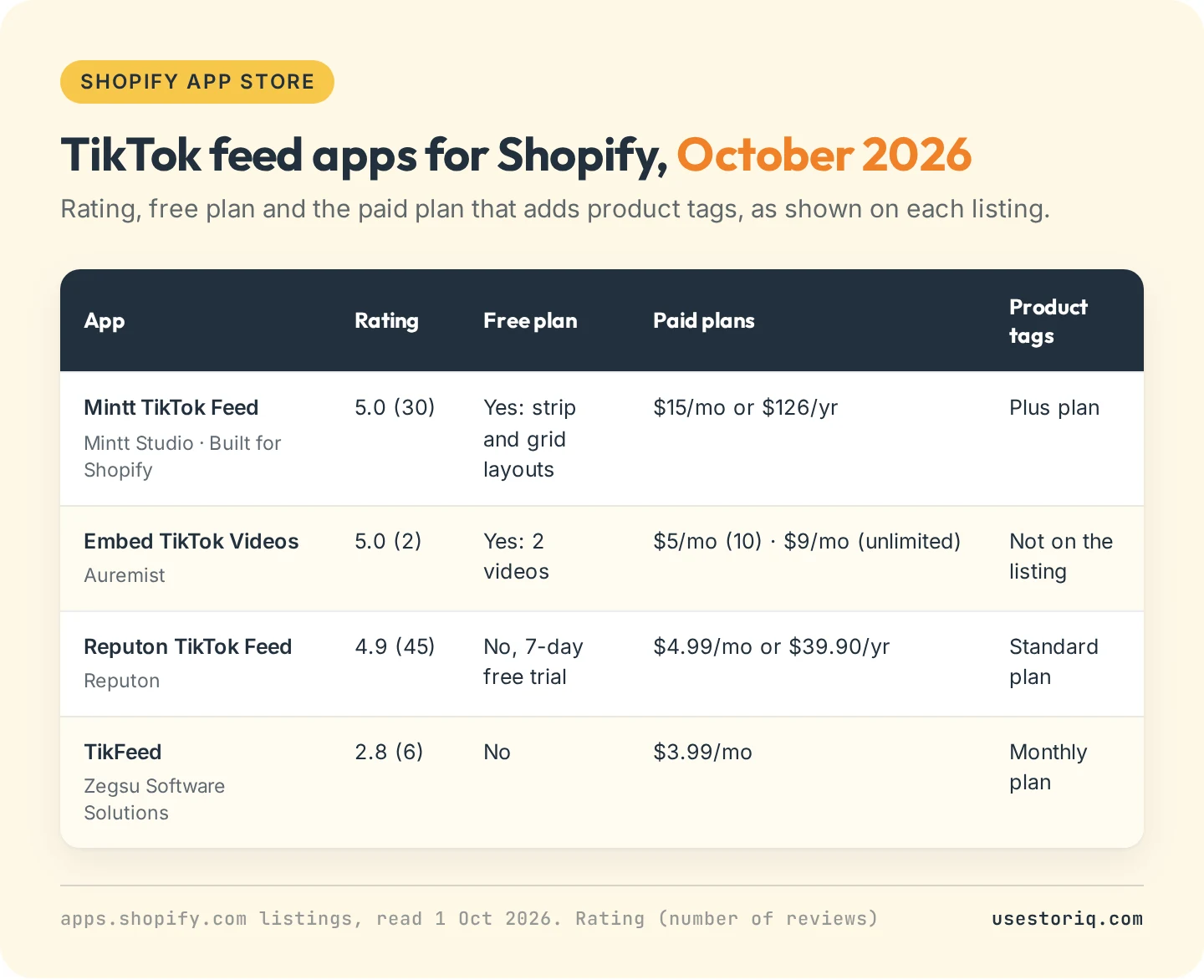
- Mintt TikTok Feed by Mintt Studio, 5.0 from 30 reviews, Built for Shopify. Free plan with strip and grid layouts. Product tags, prices and hashtag filters on Plus, $15 a month or $126 a year.
- Embed TikTok Videos by Auremist, 5.0 from 2 reviews. Free for 2 videos, $5 a month for 10, $9 for unlimited. No product tags on the listing.
- Reputon TikTok Feed, 4.9 from 45 reviews. $4.99 a month or $39.90 a year, shoppable videos, 7-day trial.
- TikFeed by Zegsu Software Solutions, 2.8 from 6 reviews, $3.99 a month with product tags.
A feed posts everything you publish unless you filter it, and product tags cost a paid plan on every app here that offers them. Our comparison of shoppable video apps for Shopify covers larger apps that also import TikToks.
Upload your TikTok videos to Shopify
An upload takes more work per clip, but the video plays in your store's own player, sends no one to TikTok and survives the post being deleted.
Get the original file
The best file is the export from your editing app or camera roll. TikTok's help center on downloading content recommends turning on Save to device under More options on the Post screen. For a posted video, Share > Save video works if the creator allows downloads, and TikTok's page on managing downloads says you keep that option on your own videos even with downloads off.
A customer's or creator's TikTok is different: being able to download it gives you no right to use it in your marketing. Get written permission first.
Check the music
TikTok's Commercial Music Library terms state that "Commercial Uses outside of TikTok are not permitted", and grant no commercial rights at all for sounds outside that library. A trending track is licensed for TikTok, not for your product page. Export the clip with your own voice-over or licensed audio.
Add it to your store
Shopify's file requirements accept MP4, MOV and WebM up to 1 GB and 10 minutes, list 9:16 among the recommended aspect ratios, and allow 250 videos and 3D models on the Basic plan. Then use the file as:
- Product media, in the product's Media section. Our guide to adding video to a Shopify product page covers how themes play it, and Shopify product video size lists export settings. A TikTok link won't work there: product media accepts only YouTube and Vimeo URLs.
- A story with a product card. A vertical TikTok already fits a full-screen story, opened from bubbles on the page, with a card showing the product's name and price. Our page on shoppable stories explains the format.
TikTok embed not working: troubleshooting
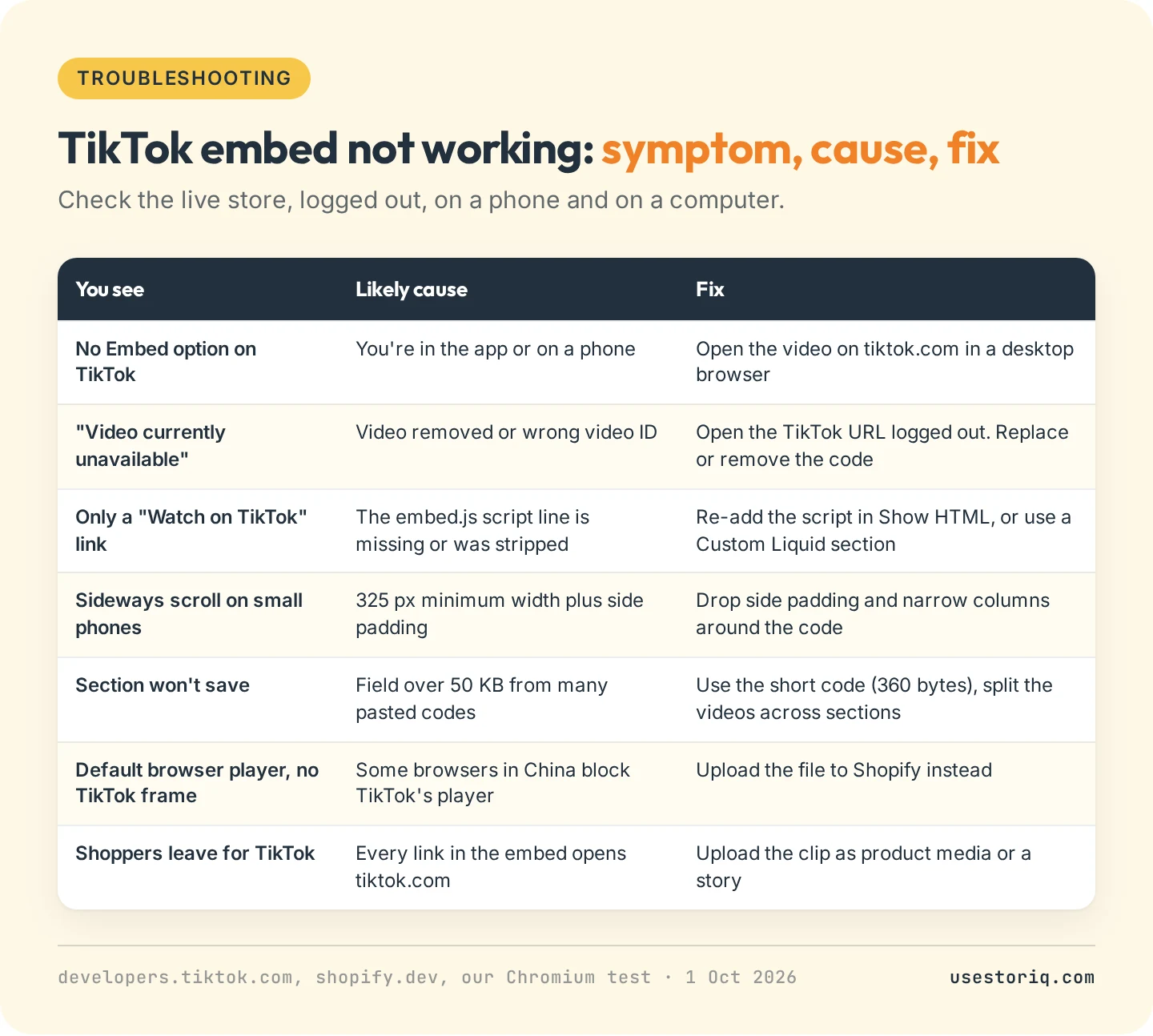
With the ID of a video that doesn't exist, the frame read "Video currently unavailable" in a 310 px box, and TikTok's documentation confirms that a video removed from the app stops working as an embed. Without the script line, only the fallback link showed. TikTok also notes that some browsers in China replace its player with the browser's default one.
TikTok videos as stories with Storiq

Storiq is our app for the upload route. It adds story bubbles and a full-screen viewer to your theme through a theme app block, with no code. Storiq does not connect to TikTok: you upload the clip you saved, it lands in your Shopify Files library, and you add it to a story targeted to a product, a collection or the whole store. A slide can carry a tappable product card with the image, title and price read live from your catalog. The Free plan covers 3 active stories and 1,000 story views a month on product pages. Product cards start on Starter at $9.99 a month, with a 7-day free trial. The app launched on 29 September 2026 and has no reviews yet.
Frequently asked questions
Can Shopify integrate with TikTok?
Yes, through the free TikTok app by TikTok Inc. It syncs your products to TikTok Shop, runs TikTok ads and the pixel, and in the US can auto-post your Shopify product videos to your TikTok account. It sends content to TikTok. To show TikTok videos on your store, use an embed code, a TikTok feed app or an upload.
How do I add TikTok videos to Shopify for free?
Open the video on tiktok.com in a desktop browser, click Share, then Embed, and copy the code. In Shopify, go to Online Store > Themes > Customize, add a Custom Liquid section, paste the code and save. For a page or blog post, paste it in the editor's Show HTML view.
Is there a TikTok feed app for Shopify?
Several. As of October 2026, Mintt TikTok Feed (5.0 from 30 reviews) has a free plan and tags products on its $15 a month Plus plan. Reputon TikTok Feed costs $4.99 a month, TikFeed $3.99 a month, and Embed TikTok Videos by Auremist has a free plan for 2 videos.
Can I add videos to my Shopify store?
Yes. Shopify accepts MP4, MOV and WebM files up to 1 GB and 10 minutes, uploaded in Content > Files or in a product's Media section. Vertical 9:16 is one of Shopify's recommended aspect ratios, so a TikTok clip fits as it is.