How to add Instagram Reels and TikTok videos to Shopify: embeds, feed apps and stories
There are three ways to put a Reel or a TikTok on a Shopify store: paste the embed code, install a feed app, or upload the clip itself. This guide compares where each one plays, whether shoppers leave your store, product tags, cost and what breaks.
You can add Instagram Reels to Shopify in three ways. Paste the Reel's embed code into a Custom Liquid section or a page. Install a feed app that syncs your Instagram account and shows your Reels in a grid or slider. Or take the clip itself and upload it to Shopify, as product media or as a story with a product card. TikTok videos work the same way, with the same three options.
The choice comes down to five things: where the video plays, whether a tap sends the shopper to Instagram or TikTok, whether the clip can carry a product tag, what it costs, and what breaks over time. Every Shopify, Instagram and TikTok rule below was checked on their help centers and developer docs on 1 October 2026, and every app on its Shopify App Store listing the same day.
Three ways to add Instagram Reels to Shopify, compared
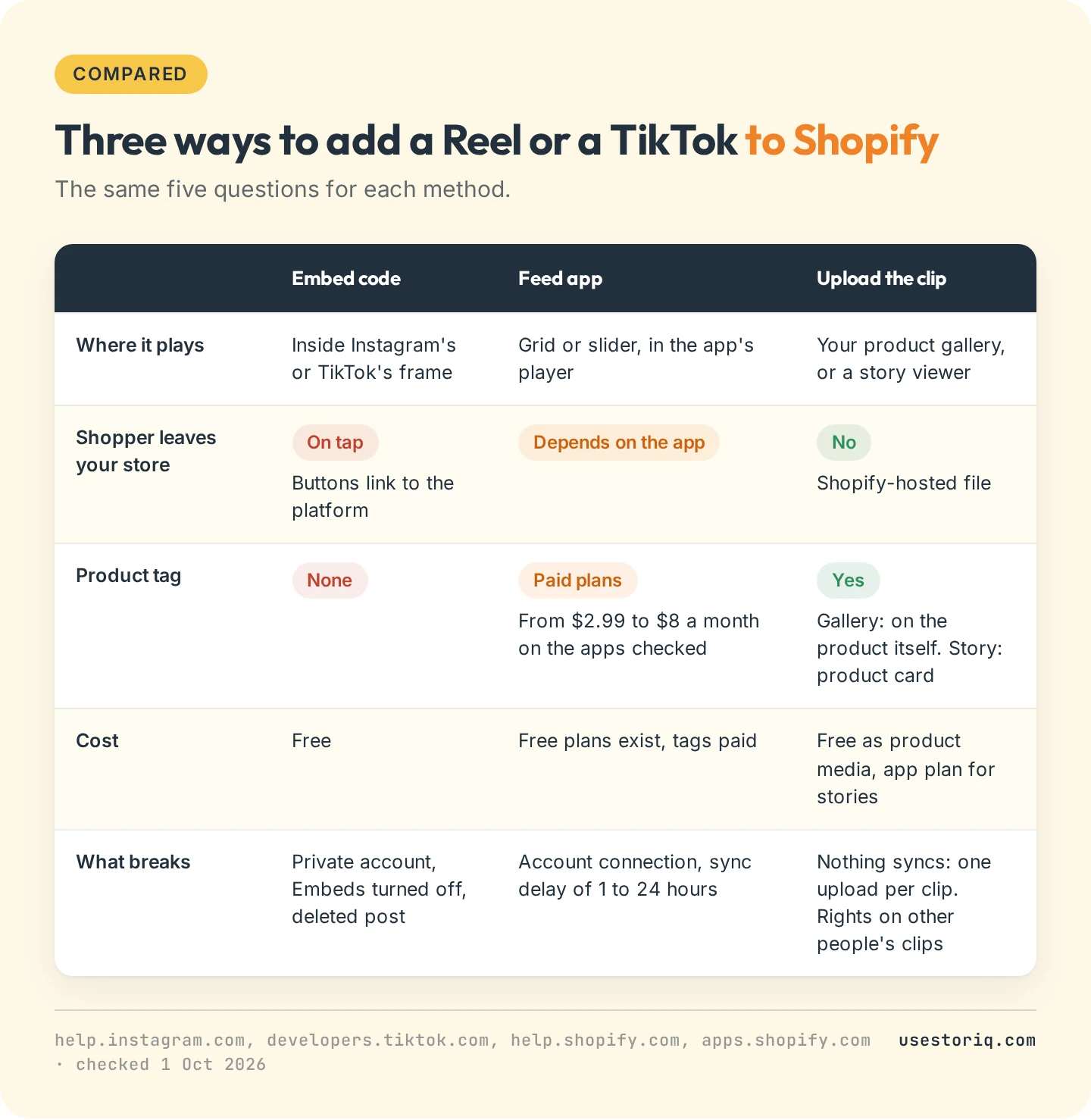
The embed is free and needs no app, but the video plays inside Instagram's or TikTok's frame and sends taps back to the platform. A feed app keeps your Instagram Reels on Shopify in sync with your account, and product tags usually cost a monthly plan. The upload takes the most work per clip and gives you the most control: the video plays in your store's own player, next to the product.
Method 1: embed a Reel or a TikTok with its embed code
Copy the embed code from Instagram or TikTok
On Instagram, open the Reel on instagram.com in a browser, click the three-dot menu and choose Embed, then copy the code. Instagram's help center on embeds sets three conditions: you can't copy embed codes from the Instagram app, private accounts can't be embedded, and a public account can turn its Embeds setting off. The embedded Reel shows the account's username and a link to Instagram.
The quickest way to add TikTok videos to Shopify is the same kind of embed. Open the video on tiktok.com from a desktop browser, click Share, then Embed, and copy the code. TikTok's embed documentation notes that the embed page must be opened "from a non-mobile surface". The code is a blockquote followed by a script tag that loads TikTok's player.
Paste it into a Custom Liquid section or a page
To embed an Instagram Reel on Shopify without touching theme files, use the Custom Liquid section:
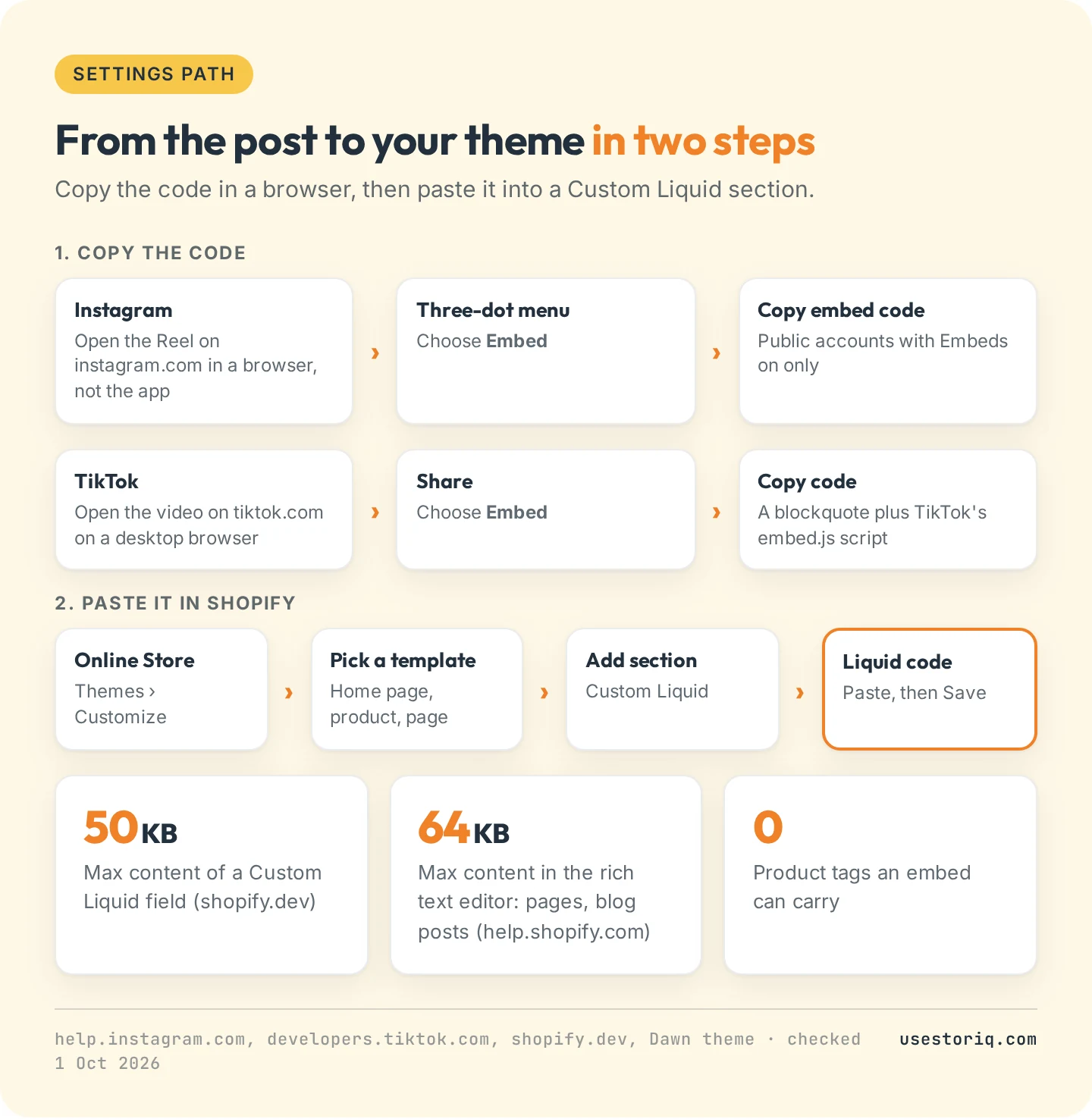
- In your admin, go to Online Store > Themes > Customize.
- Pick the template from the top menu: home page, a product template, a page.
- Click Add section and choose Custom Liquid.
- Paste the embed code into the Liquid code field and click Save.
In Dawn, Shopify's free reference theme, this section's help text reads "Add app snippets or other code to create advanced customizations." Shopify's developer docs state that this type of field accepts HTML and limited Liquid, and that its content "can't exceed 50kb". Our guide to embedding an Instagram Reel on Shopify gives the minimal code, how to size it and what to check when it shows up blank.
A Custom Liquid section on a product template shows on every product that uses the template. To show one Reel on one product, create an alternate product template for it, or paste the code in that product's description.
For a page, a blog post or a product description, click Show HTML in the rich text editor and paste the code where the video should appear. Shopify caps rich text content at 64 KB. In a product description, the video lands in the middle of the text, often below the fold.
What breaks with an embed
The embed depends on the platform, and you have no control over it:
- The account goes private or turns off embeds. Instagram's help center warns that embeds already on other sites "may take time to be removed", and then they stop showing.
- The video is deleted. TikTok's docs say a video removed from the app is "no longer accessible" in its embedded form either.
- Taps leave your store. TikTok's docs state that "all buttons and texts on the embedded video are interactive" and link to tiktok.com, and that the player shows recommended videos after playback. Those recommendations come from TikTok, not from your catalog.
- No product tag. Neither embed can point to a product. The shopper has to scroll back to your buy button.
There is also the page weight. We loaded TikTok's own documentation example in a headless Chrome browser four times on 1 October 2026, without clicking anything.
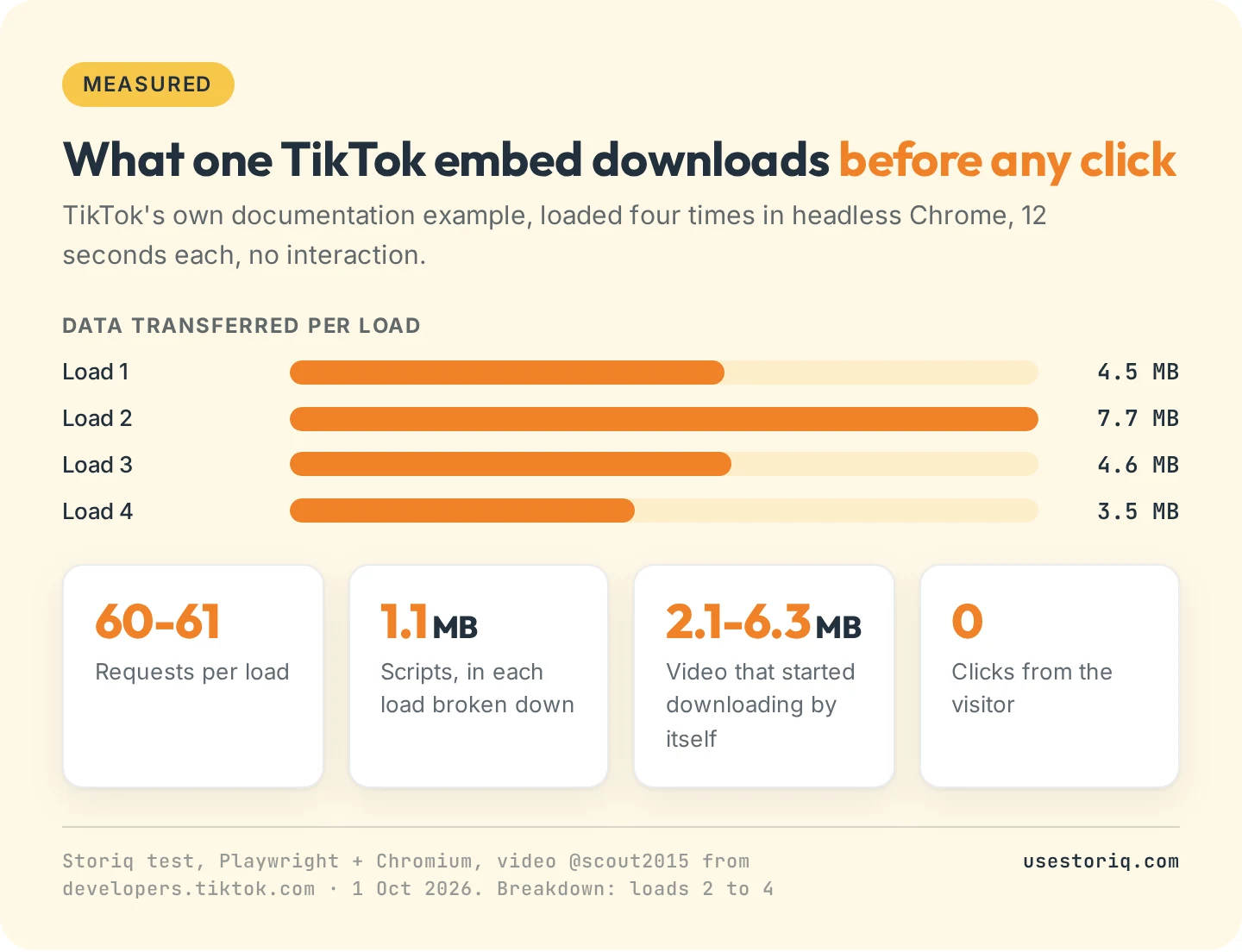
Each load made 60 or 61 requests and transferred between 3.5 and 7.7 MB in 12 seconds. In the three loads we broke down by file type, scripts weighed about 1.1 MB each time, and the video, which started downloading on its own, 2.1 to 6.3 MB. One embed at the top of a home page costs your mobile shoppers that data before they decide to watch anything.
Method 2: an Instagram Reels or TikTok feed app
A feed app connects to your Instagram or TikTok account, pulls your posts and displays them as a grid or slider on your store. New Reels appear without you copying anything. This is what most "Instagram Reels Shopify app" results on the App Store do.
Feed apps on the Shopify App Store, October 2026
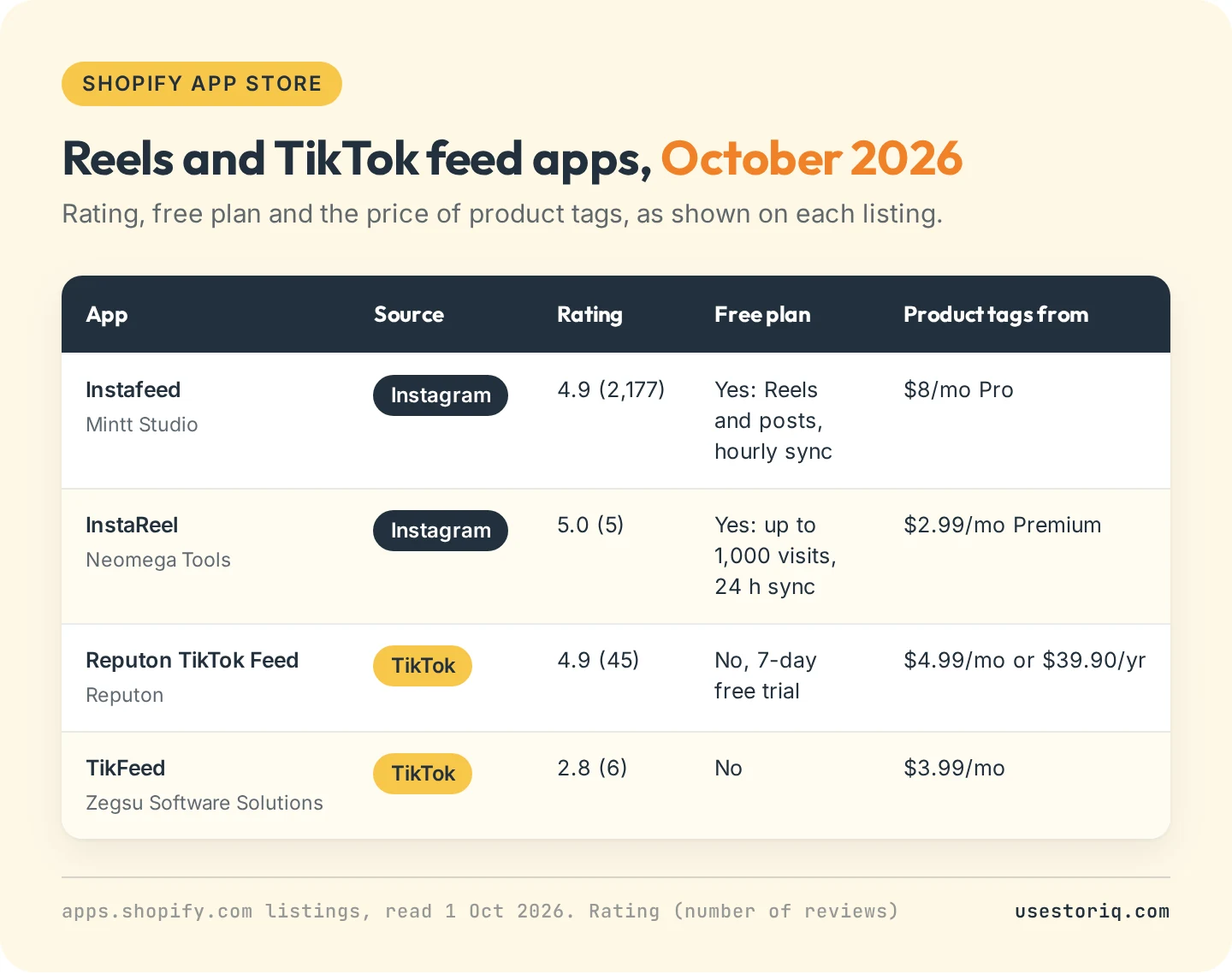
- Instafeed by Mintt Studio, rated 4.9 from 2,177 reviews. The free Starter plan shows Reels and photo posts with hourly sync. Product and collection tags, shop now and add to cart buttons come with Pro at $8 a month. Plus, at $20 a month, adds auto-tagging, posts you're tagged in and custom media uploads.
- InstaReel by Neomega Tools, rated 5.0 from 5 reviews. The free plan covers up to 1,000 visits with a sync every 24 hours. Premium, at $2.99 a month, adds product tagging and syncs every few hours.
- Reputon TikTok Feed, rated 4.9 from 45 reviews. One Standard plan at $4.99 a month or $39.90 a year, with shoppable videos, autoplay and add to cart, and a 7-day free trial.
- TikFeed by Zegsu Software Solutions, rated 2.8 from 6 reviews, at $3.99 a month with product tags on the feed.
Instafeed has by far the most reviews. InstaReel and TikFeed cost less for product tags, with far fewer reviews to judge them on.
What breaks with a feed app
- The account connection. The feed shows what the connected account posts. If that connection breaks (a changed password, a removed permission), the feed stops updating until someone reconnects it.
- Sync delay. A new Reel takes from one hour (Instafeed's free plan) to 24 hours (InstaReel's free plan) to appear.
- Everything you post goes up. The feed follows your posting, including Reels unrelated to any product. Some apps, InstaReel for one, let you hide or pin posts, which is manual work again.
- Product tags are a paid feature on every app checked here.
Method 3: upload the clip to Shopify
The third way to add Instagram Reels to Shopify skips the platform. You take the video file and put it on your store as Shopify-hosted media. It plays in your store's player, never sends the shopper to Instagram or TikTok, and keeps working if the post is deleted.
Start from the original file
Start from the file you had before posting, at full quality. TikTok's help center recommends saving videos before you post: on the Post screen, tap More options and turn on Save to device. For a video already posted, Share > Save video works only if the creator allows downloads. For Reels, keep the export from your editing app or your camera roll.
As product media
Open the product in your admin and upload the file in the Media section. Shopify's product media requirements allow MP4, MOV or WebM, up to 10 minutes, 1 GB and 4K. The same page states that "URLs other than YouTube or Vimeo URLs aren't supported", so pasting a Reel or TikTok link there fails. Our guide to adding video to a Shopify product page covers how each theme plays gallery videos, and the page on Shopify product video size lists the export settings.
The clip then sits among the product photos. It needs no product tag, because the shopper is already on the product.
As a story with a product card
A vertical clip filmed for Reels or TikTok fits the story format without editing: full screen, tap to skip, a few seconds per slide. A stories app shows bubbles on your page and opens the clip in a full-screen viewer, where a slide can carry a card with the product's image, name and price. Our page on shoppable stories explains how this differs from an Instagram feed widget, and the one on what shoppable video is lists the other formats. The guide to adding Instagram-style stories to Shopify covers what to film and where to place the bubbles.
The cost of this method is the manual step. Each clip is uploaded once, by you, and nothing syncs.
Whose clip is it?
Your own footage is yours to reuse, with one exception: music. Instagram's help center on its music library states that the licensed tracks are "intended for personal, non-commercial use", so export your Reel without the track before it goes on a store page. A customer's or creator's clip is not yours to reuse, even when TikTok lets you download it: the download setting covers saving the video, not using it in your store's marketing. Embedding a public Reel uses Instagram's own embed feature, which the account owner controls. Downloading the clip and uploading it to your store falls outside that permission. Ask the creator for written permission first, and keep the message: our guide to UGC video usage rights on Shopify lists what that permission should cover and when the FTC expects a disclosure.
The official Instagram and TikTok apps work the other way
Searching "Can Shopify integrate with Instagram?" leads to Meta's Facebook & Instagram app (3.9 from 5,720 reviews), and the TikTok question leads to the TikTok app by TikTok Inc. (4.8 from 15,991 reviews). Both are free to install and both are useful, but in the other direction. Meta's listing describes syncing your eligible products to your Facebook and Instagram shop. TikTok's describes syncing products from Shopify to TikTok, creating ads and managing TikTok Shop orders.
Neither listing describes showing Reels or TikToks on your Shopify storefront. They send your products out to the platforms. To bring the videos in, you still need one of the three methods above.
Which method for which goal
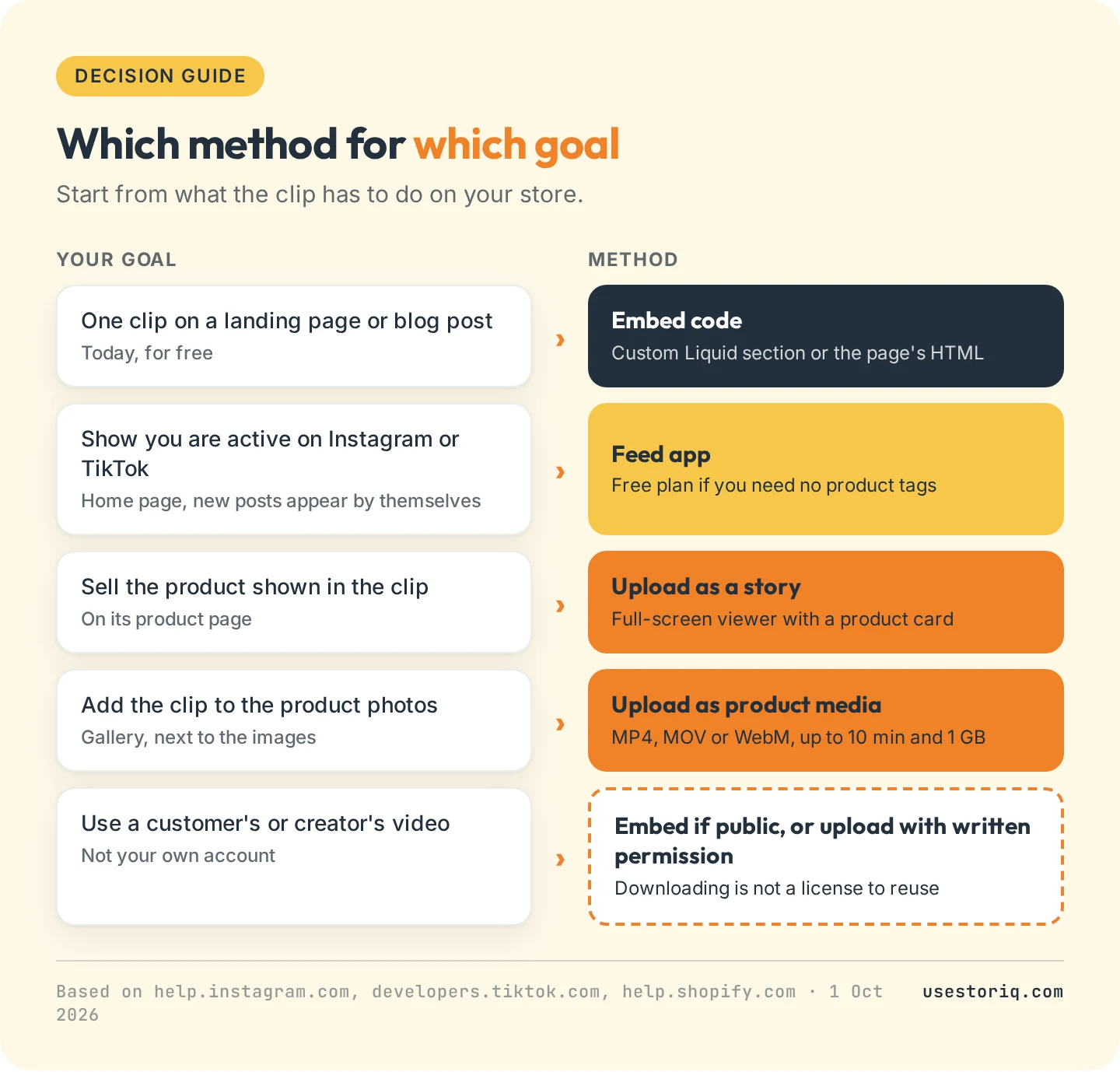
- One clip on a landing page or blog post, today, for free: the embed code in a Custom Liquid section or the page's HTML.
- A home page section that shows you are active on Instagram or TikTok: a feed app. Its free plan is enough if you don't need tags.
- Selling the product shown in the clip, on its product page: upload the clip and publish it as a story with a product card, or as product media in the gallery.
- A customer's or creator's video: embed it if their account is public, or get written permission before you upload it. For clips customers send with their reviews, see our guide to video reviews and testimonials on Shopify.
The methods also combine: a feed app on the home page to show your activity, and your best Reels re-uploaded next to the products they show.
Reels and TikToks as stories with Storiq
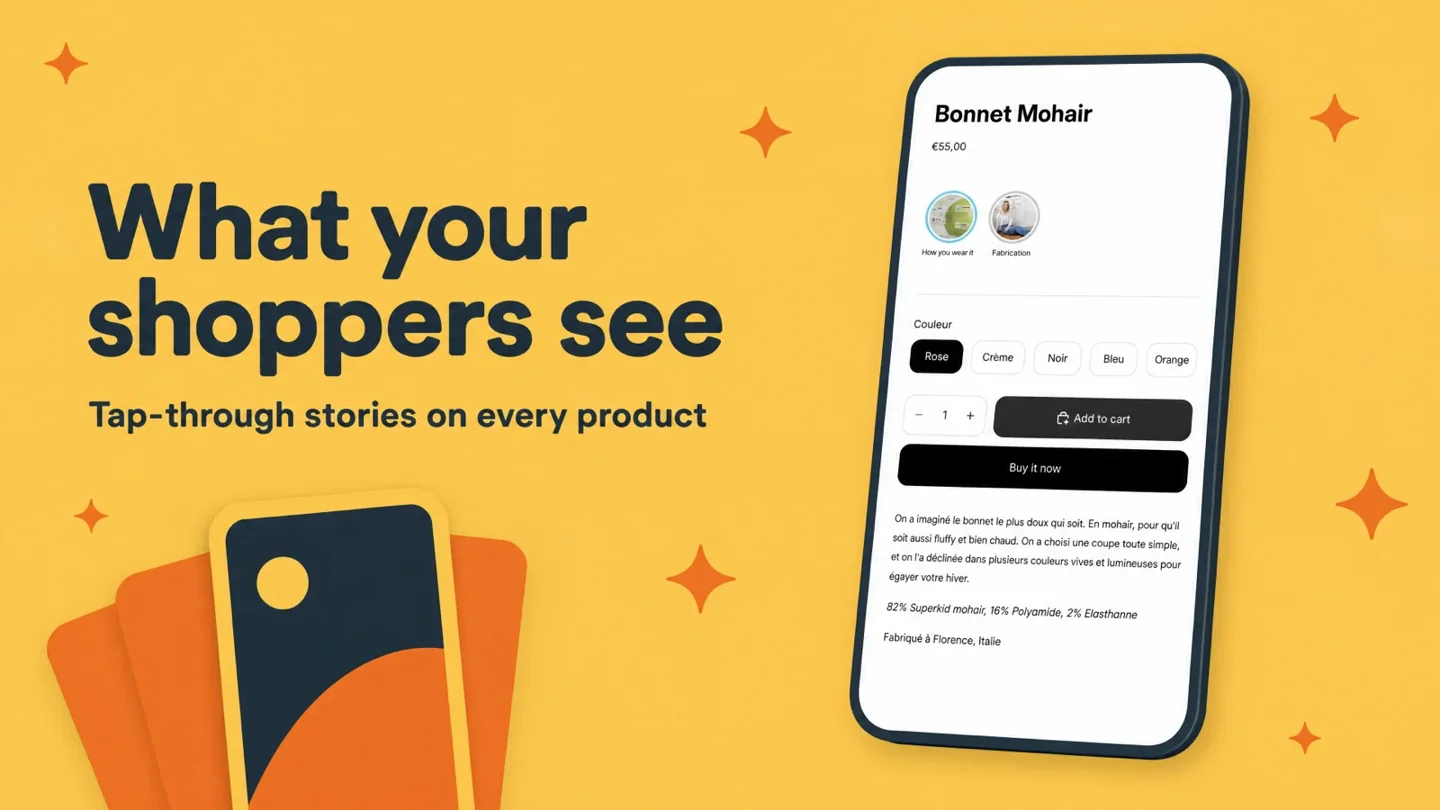
Storiq is our app for the third method. It adds story bubbles and a full-screen viewer to your theme through a theme app block, with no code. Storiq does not connect to Instagram or TikTok: you save the clip, upload it in Storiq (it lands in your Shopify Files library), and add it to a story targeted to a product, a collection or the whole store. The Free plan runs 3 active stories and 1,000 story views a month on product pages. Product cards with the price read live from your catalog start on Starter at $9.99 a month, with a 7-day free trial. The app launched on 29 September 2026 and has no reviews yet.
Frequently asked questions
Can you embed Instagram Reels on a website?
Yes, if the account is public and its Embeds setting is on. Open the Reel on instagram.com in a computer or mobile browser, open the menu, choose Embed and copy the code. Instagram's app does not give embed codes, and Reels from private accounts cannot be embedded.
How do I add TikTok videos to Shopify for free?
Open the video on tiktok.com in a desktop browser, click Share, then Embed, and copy the code. In Shopify, go to Online Store > Themes > Customize, add a Custom Liquid section where you want the video, paste the code and save. For a page or blog post, paste it in the editor's HTML view instead.
Can Shopify integrate with Instagram?
Yes, through Meta's Facebook & Instagram app, but it works in the other direction: it syncs your products to an Instagram shop and runs ads. To show Reels on your store, you need an embed code, a feed app such as Instafeed, or to upload the clips yourself.
What is the best Instagram Reels app for Shopify?
It depends on what you need. As of October 2026, Instafeed by Mintt Studio has the most reviews (4.9 from 2,177) and a free plan with Reels, but product tags start on its $8 a month Pro plan. InstaReel tags products from $2.99 a month and has 5 reviews.
Can I add an Instagram Reel link as Shopify product media?
No. Shopify's product media accepts video links from YouTube and Vimeo only. To show a Reel in the product gallery, upload the video file itself: MP4, MOV or WebM, up to 10 minutes and 1 GB.