Shoppable stories: what they are, and how they differ from an embedded Instagram feed
Shoppable stories are full-screen, tap-through slides on your own store, each able to carry a product card. An Instagram feed widget shows your posts in a grid. This page shows how to tell them apart and when each one fits.
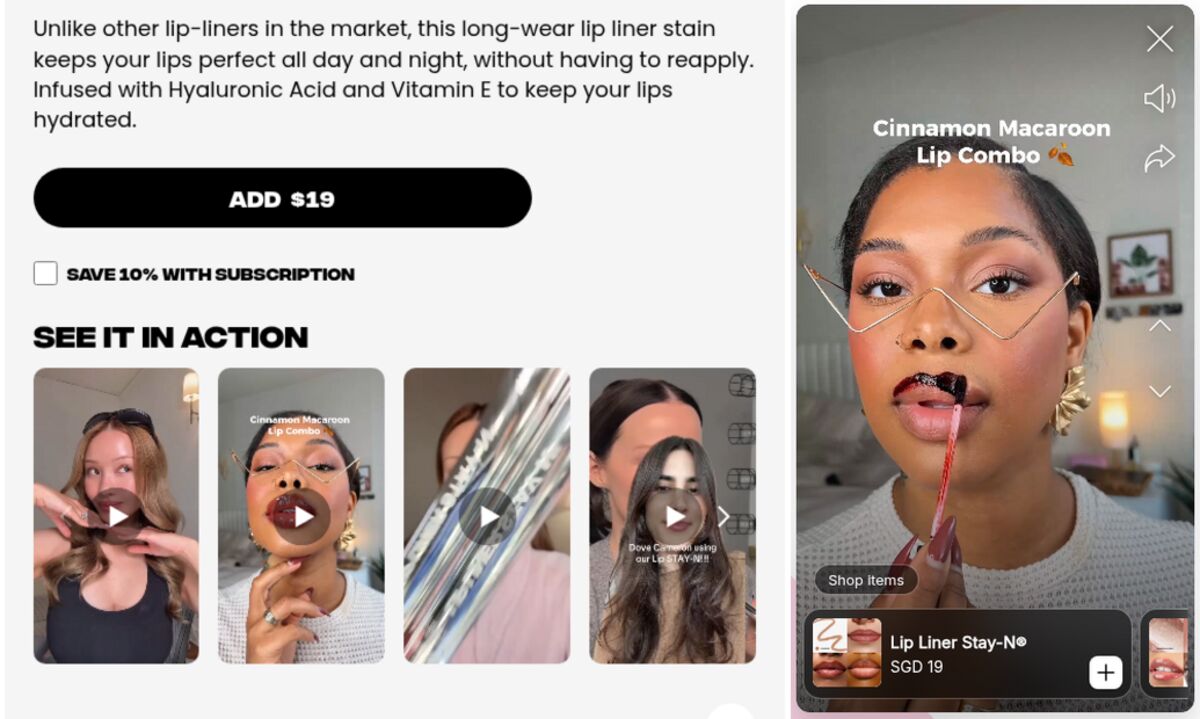
Shoppable stories are sequences of full-screen slides, photos or short videos, that shoppers tap through on your store, where each slide can carry a card for the product it shows. They borrow the story format from Instagram and place it on your own pages, next to the product, instead of on a social app.
People often mix them up with Instagram feed widgets, the apps that pull your Instagram posts into a grid on your site. The two share a source, your social content, and serve different jobs. This page defines the format, then draws the line between the two.
How shoppable stories work
A shoppable story has four parts that shoppers recognize from social apps:
- Bubbles: small circles with a cover image. Tapping one opens the story.
- A full-screen viewer: slides play one after the other, with progress bars at the top. Tap to advance, hold to pause, swipe down to close.
- Short slides: a photo stays on screen a few seconds, a video plays its length. A story usually runs three to six slides.
- Product cards: a slide that shows a product carries a card with its image, name and price, and a tap leads to the product.
The format works because it asks nothing of the shopper. A gallery waits for a click on each thumbnail. A story starts, runs, and lets the shopper speed up or leave.
Shoppable stories on Instagram vs on your store
Instagram has its own shoppable stories. According to Instagram's help center, a business with an approved Instagram shop can add one product sticker per story, with up to 5 products tagged. Since September 2025, Meta's shops send buyers to the seller's website to pay.
On Instagram, the shopper who taps the sticker still has to leave the app, land on your store and find the right variant. On your store, the story sits on the product page itself, one tap away from the add-to-cart button, and stays up as long as you decide.
Shoppable stories vs an embedded Instagram feed
An Instagram feed app does something different: it syncs your Instagram account and displays your posts on your site, as a grid or a slider. Two examples from the Shopify App Store, as listed on 18 September 2026:
- Instafeed by Mintt Studio, rated 4.9 from 2,149 reviews, displays feeds, Reels and UGC. Its free plan shows the feed. Product tags and add-to-cart buttons start on the Pro plan at $8 a month.
- Elfsight Instagram Gallery, rated 4.7 from 56 reviews, costs $5.99 a month and lists no product tagging. Its stated goal is to "turn website visitors into your Instagram followers".
| Shoppable stories | Instagram feed widget | |
|---|---|---|
| Source of the content | Uploaded to your store | Synced from your Instagram account |
| Layout | Bubbles, then full-screen slides in sequence | Grid or slider of posts |
| Product link | A card on each slide | Tags on posts, when the app and plan support it |
| Placement | Product pages first, then home and collections | Usually home page or a dedicated section |
| Main job | Answer questions about one product | Show social proof and activity |
| Life span | You set start and end dates | Follows your Instagram posting |
One more constraint separates them. Instagram's help center states that third-party platforms can tag products in feed posts, but "can't add product tags on Instagram Stories, Reels and mentions". A feed app can therefore show your Instagram story content only as media. The product link has to be rebuilt on your store.
When to use which
Use a feed widget when your Instagram account is active and you want visitors to see that activity: a home page section showing recent posts works as social proof.
Use shoppable stories when the content is about a specific product and the shopper needs it before buying: how a fabric moves, how the product assembles, what it looks like on different people. That content belongs next to the product, in a format that plays by itself and ends on the product card.
Many stores run both, and the same clip can serve each: a Reel posted on Instagram, then republished as a story on the matching product page.
For a wider view of the category, see what shoppable video is, and for placement and what to film, our guide to adding Instagram-style stories to Shopify.
Shoppable stories on Shopify with Storiq
Storiq adds shoppable stories to Shopify product pages through a theme app block, with no theme code. You build each story from images and videos in your Shopify Files library. On paid plans, a slide can carry a product card whose price is read live from your catalog, and a story can run between a start date and an end date. Opens, completion rate and clicks show story by story in the dashboard. To reuse a Reel, upload the clip to Storiq or to Shopify Files and add it to a story.
Frequently asked questions
What are shoppable stories?
Shoppable stories are sequences of full-screen slides, photos or short videos, that shoppers tap through on a website or app, where a slide can carry a link or card for the product it shows. They reuse the story format from Instagram and place it on the brand's own store.
How do I make my Instagram stories shoppable?
On Instagram itself, add a product sticker to the story: one sticker per story, with up to 5 products tagged. Your business needs an approved shop on Instagram, and product tags in Stories cannot be added through third-party tools. On your own store, a stories app lets you republish the same clips with product cards.
Is an Instagram feed on Shopify the same as shoppable stories?
No. A feed widget displays your Instagram posts as a grid or slider, synced from your account. Shoppable stories are built on your store, play full-screen in sequence and attach a product to each slide. Some feed apps add product tags to posts: Instafeed, for example, does it on its paid Pro plan.
Where should shoppable stories go on a Shopify store?
On product pages first, next to the gallery, where the shopper has questions about one product. Home page and collection pages come next, for new arrivals and drops.