Video reviews and testimonials on Shopify: apps, FTC rules and placement
Collect video reviews with a review app or a testimonial app, keep them within the FTC's rules, and place them where shoppers decide. Which apps include video on which plan, as of October 2026, and where each clip goes on the store.
To add video testimonials on Shopify, collect the clips with a review app that accepts video or a testimonial app that sends customers a recording link, then place them with an app block in your theme. As of October 2026, Judge.me includes unlimited photo and video reviews on its free plan, while Loox puts video reviews on its $49.99 a month Convert plan. Two FTC texts apply to every clip you show: the Consumer Reviews and Testimonials Rule (16 CFR Part 465) and the Endorsement Guides (16 CFR Part 255).
Every app below was checked on its App Store listing, and every rule on ftc.gov and help.shopify.com, on 1 October 2026. Usage rights and Shopify's video file limits are in our guide to UGC video on Shopify.
Video reviews vs video testimonials
A video review is a clip a customer submits with a rating, shown in your reviews section. A video testimonial is a clip you feature as marketing: next to the buy button, on the home page, in an ad. The FTC's Q&A on the Consumer Reviews and Testimonials Rule draws the same line, and the two follow different rules.
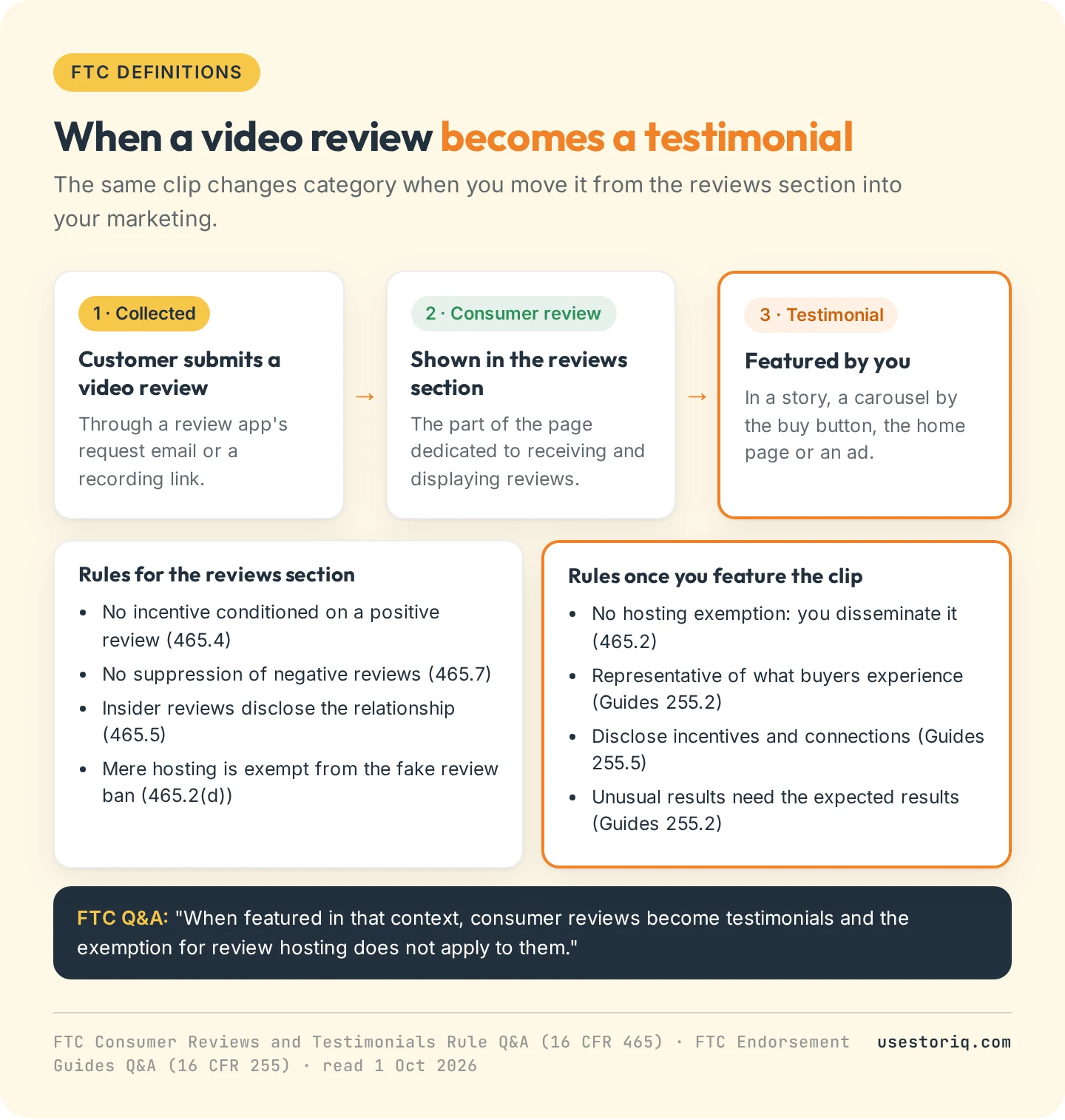
- Featured reviews become testimonials. The rule exempts businesses that only host reviews, but not for reviews they feature in marketing: "When featured in that context, consumer reviews become testimonials." A video review you lift out of the widget and play in a story is a testimonial.
- Incentivized reviews are testimonials too. If you pay or give something for reviews, the FTC counts them as consumer testimonials.
How to collect video reviews on Shopify
Review apps that accept video
Most review apps collect photos and videos with the written review, through a request email after the order. The App Store's product reviews category has a "Video reviews" filter, and the four apps below carry it, on different plans.
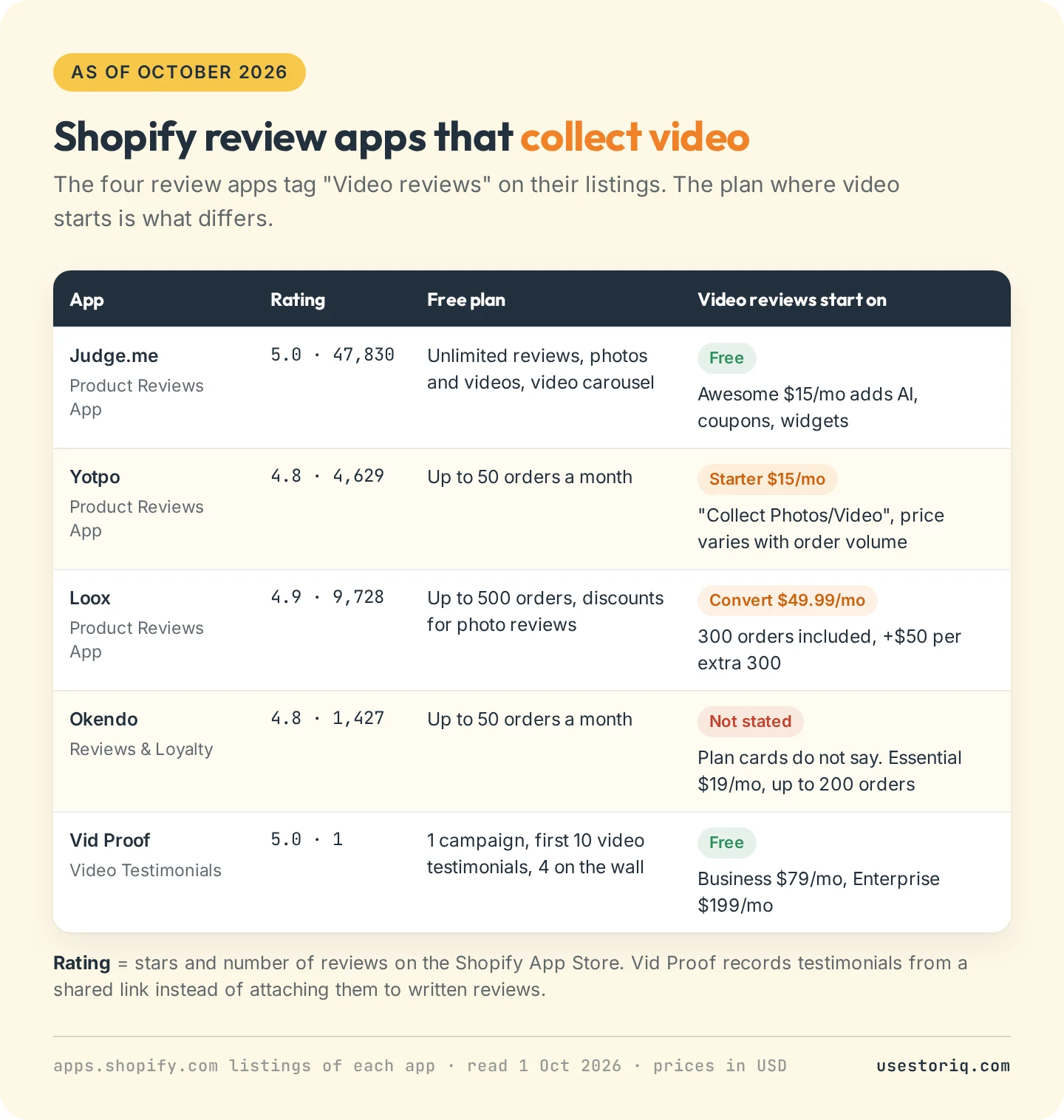
- Judge.me Product Reviews App, 5.0 from 47,830 reviews. The free plan includes unlimited reviews, "unlimited visual reviews (photos/videos)" and a video carousel. Awesome, at $15 a month, adds AI replies, coupons and more widgets.
- Yotpo: Product Reviews App, 4.8 from 4,629 reviews. Free up to 50 orders a month. Photo and video collection starts on Starter at $15 a month, priced by order volume.
- Loox Product Reviews App, 4.9 from 9,728 reviews. Free up to 500 orders. Video reviews come with Convert at $49.99 a month, which includes 300 orders, plus $50 per additional 300.
- Okendo: Reviews & Loyalty, 4.8 from 1,427 reviews. Free up to 50 orders a month, Essential at $19 for up to 200. The listing tags video reviews but its plan cards do not say which plan includes them: ask Okendo before you choose.
Yotpo, Loox and Okendo price by order volume, so compare plans against your monthly orders, not the headline price.
A dedicated video testimonial app
Vid Proof - Video Testimonials by Alvis Science (5.0 from 1 review) sends customers a link to record a clip from any device with a camera, and you pick which clips appear on a "Wall of Love" embedded in your store. The free plan covers 1 campaign, the first 10 video testimonials and 4 clips on the wall. Business costs $79 a month and Enterprise $199, each with a 15-day free trial. A single review is little to judge the app on.
Asking customers for a clip yourself
You can also ask customers, by email or DM, to film a short clip on their phone and send the file. It costs nothing and suits a store that needs a handful of clips. Shopify's guide to testimonial videos suggests starting with loyal customers and those who already left positive feedback. If a customer already posted a review on Instagram or TikTok, our guide to adding Instagram Reels and TikTok videos to Shopify compares embedding the post with uploading the clip. Get written permission for each use either way.
FTC rules for video reviews and testimonials
The rule took effect on 21 October 2024 and lets courts impose civil penalties for knowing violations. The FTC's Endorsement Guides are not law in themselves, but ignoring them can lead to enforcement under the FTC Act.
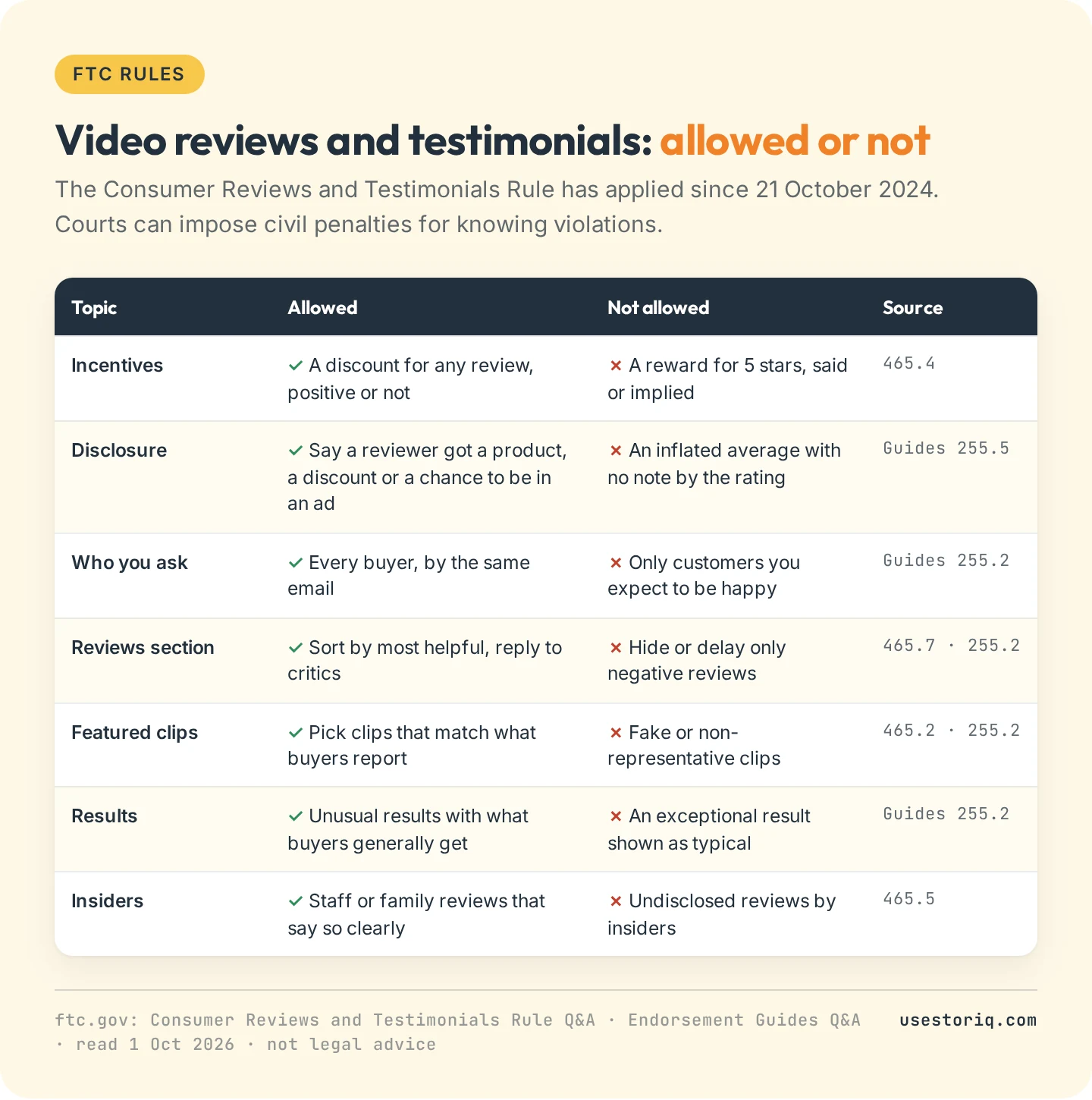
- Incentives yes, conditions on sentiment no. A discount for any review is allowed. A discount for a five-star review, or wording that implies one ("Tell us how much you loved..." is the FTC's example), violates the rule.
- Disclose the incentive. Shoppers should know a reviewer got a free product or a discount. If incentivized ratings push up your average, disclose it next to the summary rating. Even the chance to appear in an ad counts as an incentive.
- Ask every buyer. Requesting reviews only from customers you expect to be happy is misleading if it skews the reviews.
- Keep negative reviews findable. Sorting by most helpful is fine. Showing every 5-star review first can mislead, the FTC says, even with a re-sort option.
- Feature clips that are true and representative. Picking your best clips for marketing is not banned, but non-representative testimonials can be deceptive. You disseminate a testimonial on your own site, so you can be liable if it is fake.
- Put results in context. If a clip shows an above-average result, state what shoppers can generally expect, unless you can prove it is typical.
- Insiders disclose. Reviews by employees or family need a clear statement of the relationship.
How to place a disclosure inside the clip is covered in our UGC guide's disclosure section.
Where video testimonials go on your Shopify store
Review apps add their widgets as app blocks or app embeds. Shopify's help center describes app blocks as elements you add, move and remove in the theme editor (Online Store > Themes > Edit theme, then Add block or Add section and the Apps group), sometimes limited to certain page types. App embeds float over the page. After a theme switch, re-activate your apps.
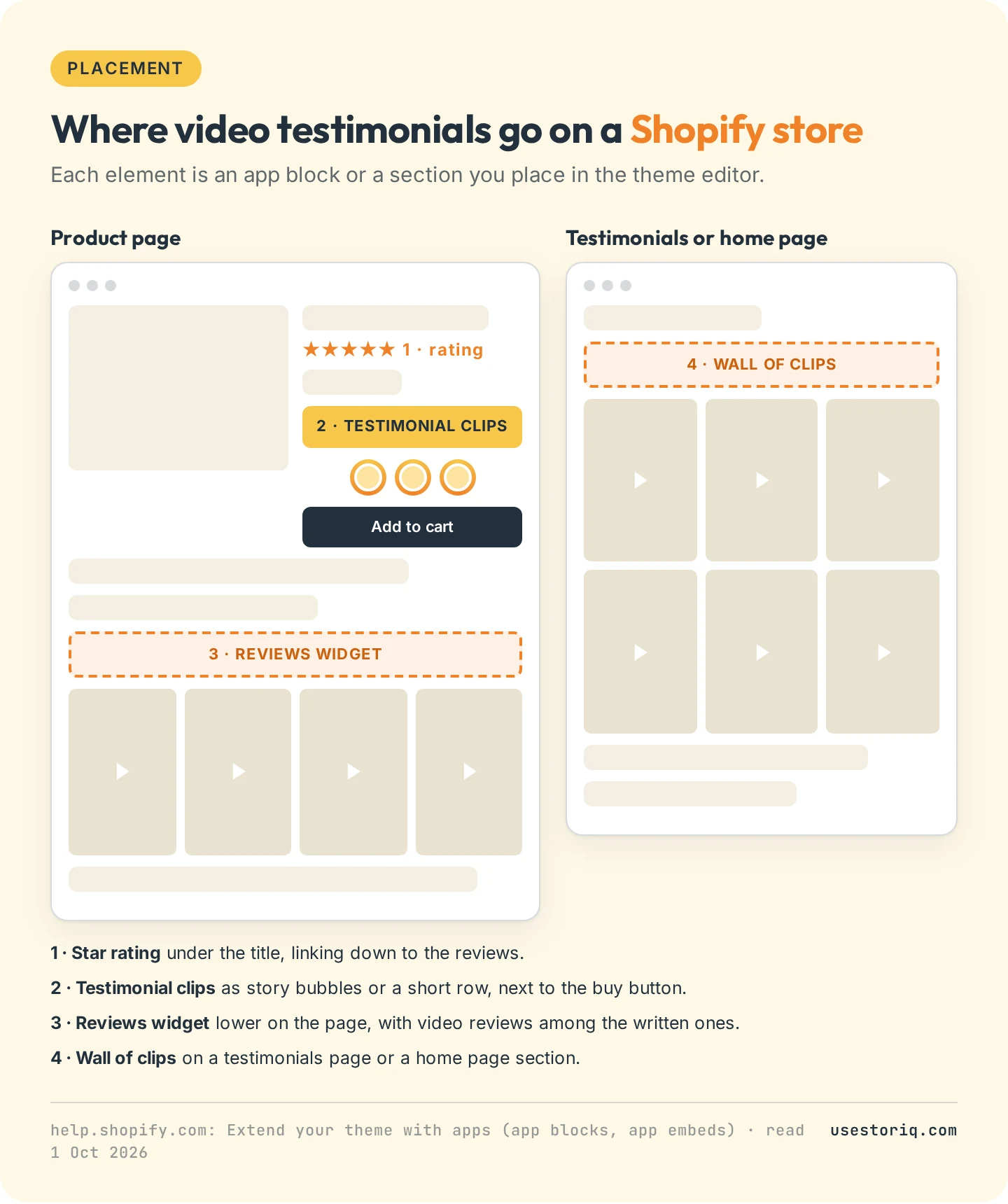
- Star rating under the product title, linking down to the reviews.
- Testimonial clips next to the buy button, as story bubbles or a short row. Our pages on shoppable stories and the Shopify video carousel cover both formats.
- The reviews widget lower on the page, video reviews included.
- A testimonials page or a home page section: a wall of clips, or a video section as described in video on your Shopify homepage.
Our list of product page questions that video answers shows which clip fits which question.
How to make a video testimonial: formats and length
Four formats cover most stores: the customer's phone review, an unboxing, a try-on or the product in use, and an interview you film yourself. Shopify sets no length. Its guide cites a 2023 JWP Connatix survey in which 64% of people said video ads should last one minute at most, and clips cut to one point each fit stories and carousels.
- Send three or four questions ahead (the problem, what changed, what surprised them) and ask for no script.
- Ask for vertical video if the clip goes in stories, with the product in frame.
- Cut the pauses and add captions for shoppers watching without sound. Export settings are on our page about Shopify product video size.
- Send the final cut to the customer for approval, and never trim a sentence so it changes what they meant.
Testimonial clips as stories with Storiq
Storiq does not collect reviews or request videos from customers. It shows the testimonial clips you already have, with permission, as stories on your store: you upload the files (they land in your Shopify Files library) and target each story to a product, a collection or the whole store. The Free plan runs 3 active stories and 1,000 story views a month on product pages. On Starter, at $9.99 a month with a 7-day free trial, a slide can carry a product card with the price read live from your catalog, and stories can run on home and collection pages. Each story's opens, completion rate and clicks show in the app. A clip featured this way is a testimonial in the FTC's terms, so the rules above apply to stories too.
Frequently asked questions
What is a video testimonial?
A video testimonial is a customer talking about their experience with your product on camera, used in your marketing: on the product page, the home page or in ads. A video review is the clip a customer submits with a rating in your reviews section. The FTC treats a review you feature in your marketing as a testimonial.
How do I add video testimonials to my Shopify store?
Collect the clips with a review app that accepts video, a testimonial app that sends customers a recording link, or by asking customers for the file directly. Then add the app's block in Online Store > Themes > Edit theme, under Add block or Add section > Apps, where you want the clips to show.
Is there a free video review app for Shopify?
Yes. As of October 2026, Judge.me's free plan includes unlimited photo and video reviews and a video carousel. Vid Proof's free plan collects your first 10 video testimonials. Yotpo and Loox put video collection on paid plans, from $15 and $49.99 a month.
How long should a testimonial video be?
Shopify sets no length. Shopify's guide to testimonial videos cites a 2023 JWP Connatix survey in which 64% of people said video ads should last one minute at most. For stories and carousels, cut each clip to one point.
Can I offer a discount for a video review?
Yes, if the discount does not depend on the review being positive, stated or implied. The FTC's reviews rule bans incentives conditioned on a particular sentiment, and its Endorsement Guides expect the incentive to be disclosed to shoppers.