The product page questions no description ever answers
Every abandoned cart is a question that went unanswered. Here are the six that come up on almost every product page, why text handles them badly, and what to show instead.
A product page that does not convert is rarely a page with bad photos. It is usually a page that leaves a question open, and the shopper resolves the question the fastest way available: by closing the tab.
The frustrating part is that you already know the answers. They are in your support inbox, in your return reasons, in the conversations you have at markets. They just never make it onto the page in a form anyone reads.
Here are the six questions that come up almost everywhere, and what actually answers them.
1. "How big is it, really?"
Dimensions in centimetres are technically an answer and practically useless. Almost nobody converts 34 cm into a mental image of a bag.
What works: the object next to something universal. A hand, a laptop, a standard mug, a person of a stated height. Two seconds of footage settles what three lines of specifications cannot.
2. "How does it fit on someone like me?"
One model, one size, one body type is the default on most stores, and it is the reason a large share of fashion returns exist.
What works: the same item on two or three people, with the height and the size worn stated plainly. You do not need a casting. Your team, your friends, your customers. The honesty is part of the appeal.
3. "What is it actually made of?"
"Premium materials" is a phrase that has been used by every store that ever sold anything, which is why it now means nothing.
What works: a close, slow, well-lit shot of the material, and a caption that says the specific thing. Not "high-quality wool" but "single-origin mohair, brushed twice." The specificity is the proof.
4. "Will it last?"
This is the question nobody asks out loud, and the one that decides between your product and the cheaper one on the marketplace.
What works: the same item after two years of use. A worn leather bag, a jacket that has been washed thirty times, a tool with a scuffed handle. No written guarantee competes with a shot of an object that has clearly survived.
5. "What do I do with it once it arrives?"
For anything that needs assembly, setup, care or a learning curve, the fear of complexity kills more sales than the price does.
What works: the unboxing and first use, compressed into ten or fifteen seconds. If it looks easy in ten seconds, it stops being a risk.
6. "Is this store real?"
A visitor arriving from an ad has no idea whether you are a workshop in Lyon or a dropshipping page that will ship from nowhere in six weeks.
What works: the people and the place. The bench, the machine, the box being packed. Thirty seconds of your actual operation does more for trust than any badge.
Why text handles all of this badly
Every one of these answers can be written. The problem is what happens when you write them.
- They make the page longer. Each added paragraph pushes the price, the add-to-cart button and the reviews further down.
- They compete with each other. A description that answers six questions answers none of them prominently.
- They are read by almost nobody. Product descriptions are skimmed, at best, and mostly by people who have already decided.
- They ask the shopper to imagine. Every one of these questions is about a physical property. Words are the slowest possible route to a physical impression.
What to do instead
Answer them visually, in short sequences, available on demand from the top of the page.
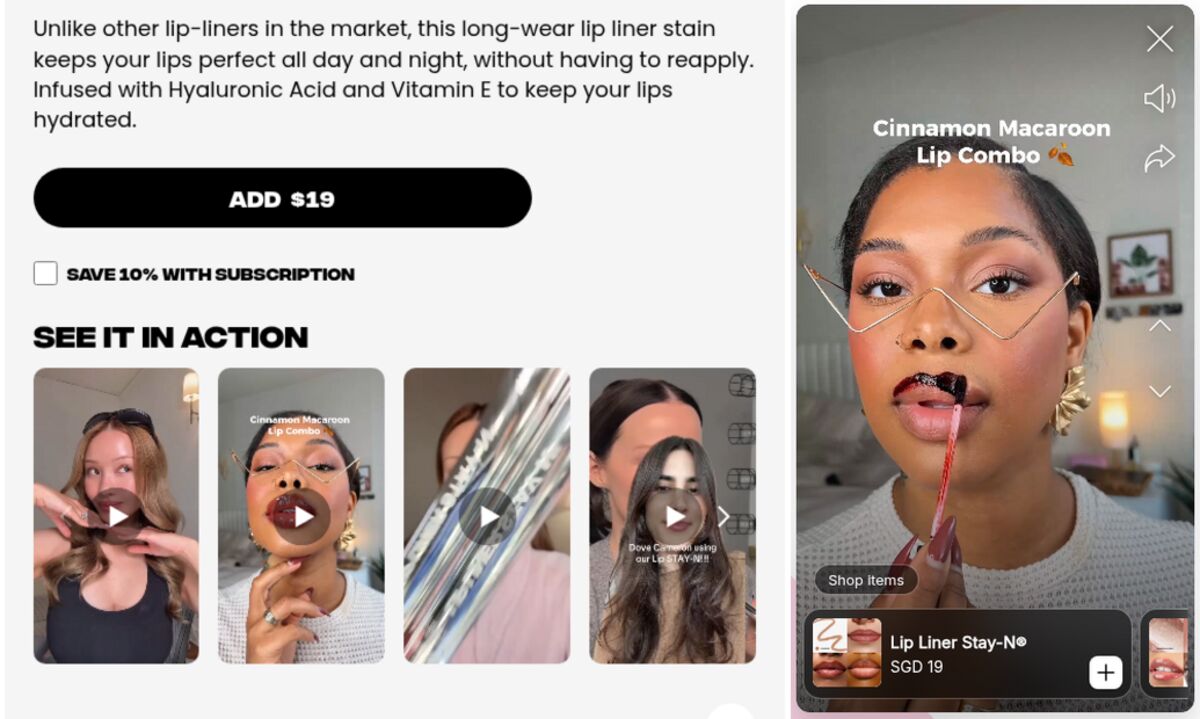
That is exactly what the story format is good at. A bubble takes almost no space. A tap opens a full-screen sequence. Each slide answers one question, with a caption that says the specific thing. The shopper who only cares about sizing taps twice and leaves satisfied; the one who wants the whole argument watches to the end.
And because the shopper is already on your store, the slide can carry the product itself: a card with the image, the title and the current price, one tap from the cart.
A practical first pass
- Open your support inbox and write down the last twenty pre-sale questions.
- Group them. You will find three or four that repeat.
- Film one short answer for each, on your phone, in one session.
- Publish them as one story on the product that gets the most traffic.
- A week later, look at the completion rate and the clicks, and rewrite the weakest slide.
Storiq handles the publishing side on Shopify: story bubbles and a full-screen viewer added from your theme editor, media stored in your own Shopify Files library, a tagged product card with a live price, and opens, completion rate and clicks measured story by story. The Free plan covers three active stories, which is enough to answer your three most common questions.
Frequently asked questions
How do I find out which questions my shoppers actually have?
Read your own support inbox and your return reasons. Pre-sale messages tell you what stops people from buying, and return reasons tell you what your page promised badly. Both are free, specific to your catalog, and more reliable than any general list.
Will answering more questions on the page make it too long?
Only if you answer them in text. A paragraph added to a description makes the page heavier for everyone. A short visual sequence that a shopper opens on demand answers the same question without pushing anything else down the page.
Does this apply to low-priced products too?
It applies wherever there is doubt, and doubt is not proportional to price. A ten-euro item that might be the wrong size still gets abandoned. The difference is how much effort the answer is worth: for cheap items, one honest slide is usually enough.