How to add Instagram-style stories to your Shopify product pages
Your customers spend hours a day tapping through stories, then land on a product page that asks them to read. Here is how the story format works on a storefront, what it changes, and how to publish your first one.
Open your phone and count how many apps show you a row of circles at the top of the screen. Instagram, WhatsApp, TikTok, LinkedIn, even your banking app has probably tried it. The story format won because it asks almost nothing from the viewer: one tap, and the content plays itself.
Now open your product page. A gallery of thumbnails, a description, a size chart, some reviews. Everything a shopper needs is there, but it is arranged as a document to be read, not as something to be watched.
Bringing the story format onto your storefront closes that gap. Here is how it works in practice.
What a story does that a gallery cannot
It plays without being asked
A gallery waits. Each thumbnail is a decision the visitor has to make: is this photo worth a click? Most people make that decision once, then move on. A story removes the decision. The first slide starts, the second follows, and the visitor only acts when they want to go faster.
It has a sequence
Photos in a gallery have no argument. A story does. You can show the product on a model, then the fabric close up, then how it packs into a bag, then the price. The order is yours, and it can build toward the moment where buying makes sense.
It carries context that a photo cannot
A caption on a slide can answer the question the image raises. "This is a size M on a 1m78 frame." "Three winters in, still no pilling." Those sentences are hard to place on a product page without cluttering it. On a slide, they belong.
What to put in your first story
You do not need a shoot. Most stores already have everything they need, sitting in a phone camera roll or in an old Instagram post.
- The fit story. The same item on two or three different people, with heights and sizes in the captions. This kills the most common pre-purchase doubt in fashion.
- The making-of. Thirty seconds of the workshop, the material, the hands. It is the content that justifies your price without a single argument about price.
- The detail tour. The stitching, the lining, the inside pocket. All the things a hero image flattens out.
- The usage story. How the product is used on a normal day. For anything non-obvious, this is worth more than a paragraph of description.
- The restock or drop. Short, urgent, dated. This one benefits enormously from being scheduled in advance.
Keep it at three to six slides. Stories are not videos: people expect to reach the end.
Where to place the bubbles
On product pages is where stories earn the most, because the visitor is already interested in one specific item and the story answers questions about that item.
On your home page, a row of bubbles works as an editorial shelf: new arrivals, the founder's picks, a seasonal guide. It gives your home page something to say beyond a hero banner.
On collection pages, stories work best when they are about the collection itself: how to choose within it, what is new in it.
If your theme is an Online Store 2.0 theme, all of this is done from the theme editor. You add the block where you want it, and the storefront takes care of the rest.
Tag the product on the slide
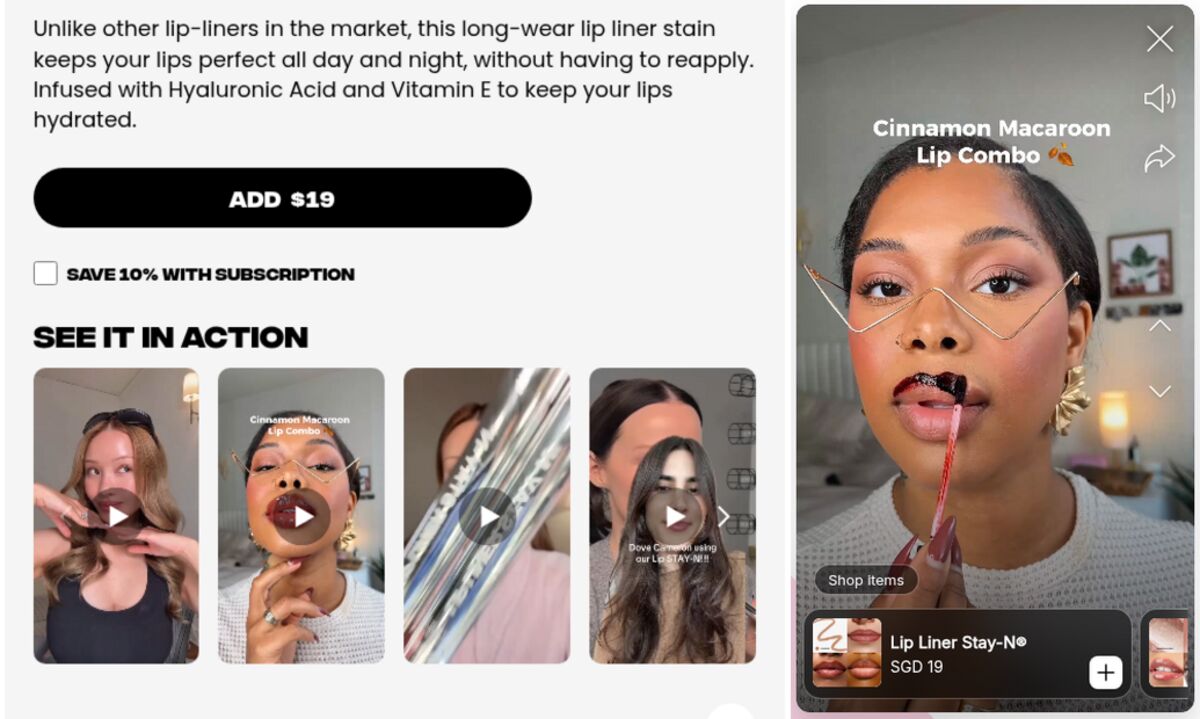
This is what separates a story on your store from a story on social. When a slide shows the product, it can carry a card with the product image, its title and its current price. The shopper taps the card and lands in the right place, still inside the flow they were in. Our page on shoppable stories compares this with an Instagram feed embedded on a store.
The price has to be read live from your catalog. A price that was copied into the story at creation time will be wrong the first time you run a sale, and a wrong price is worse than no price.
Measure three numbers, not thirty
Once stories are live, three numbers tell you almost everything:
- Opens. How many people tapped the bubble at all. If this is low, the problem is the cover image or the placement, not the content.
- Completion rate. How many reached the last slide. If this drops, your story is too long or the second slide is weak.
- Clicks. How many tapped a product card or a link. This is the one that connects the format to your revenue.
Watch them per story, not as a store-wide average. The point is to find which stories deserve to stay and which should be replaced.
Publishing your first one
Storiq adds this whole flow to a Shopify store: story bubbles and a full-screen viewer through a theme app block, media pulled from your Shopify Files library, product tagging with live prices, scheduling, and the three numbers above. The Free plan covers three active stories and a thousand story views a month, which is enough to see whether your shoppers watch them through.
Frequently asked questions
Do I need to edit my theme code to add stories?
No. On Online Store 2.0 themes, stories are added as a theme app block. You open the theme editor, drop the block into your product template, save, and the bubbles appear. No Liquid file is modified, and removing the block removes the feature cleanly.
How long should a story slide be?
Five seconds for an image is the norm, because that is what shoppers are used to on social apps. Videos should stay under fifteen seconds per slide. A whole story works best at three to six slides: long enough to make a point, short enough that people reach the end.
Will stories slow down my product pages?
Not if they are implemented properly. The bubbles should load from a deferred script, and the actual images and videos should only download once a shopper opens the viewer. Media served from Shopify's CDN adds no work for your own hosting.