Shoppable video: what actually makes it convert on a product page
Adding a video to a product page is easy. Making it sell is a different problem. Here is what separates a shoppable video that earns clicks from one that just sits there and autoplays.
Most stores that add video to a product page do the same thing: they take the Instagram reel that performed well, embed it under the description, and wait. Nothing much happens.
The video is not the problem. The problem is that the video ends and the shopper is exactly where they started, with the same decision to make and no help making it.
Shoppable video means the viewer can act on what they are watching, at the moment they want to act. That is a small change in mechanics and a large change in outcome.
The four things that make video shoppable
1. It appears where the question is being asked
A video embedded at the bottom of a product page is watched by people who already scrolled past the price, the size chart and the reviews. Those people have mostly decided.
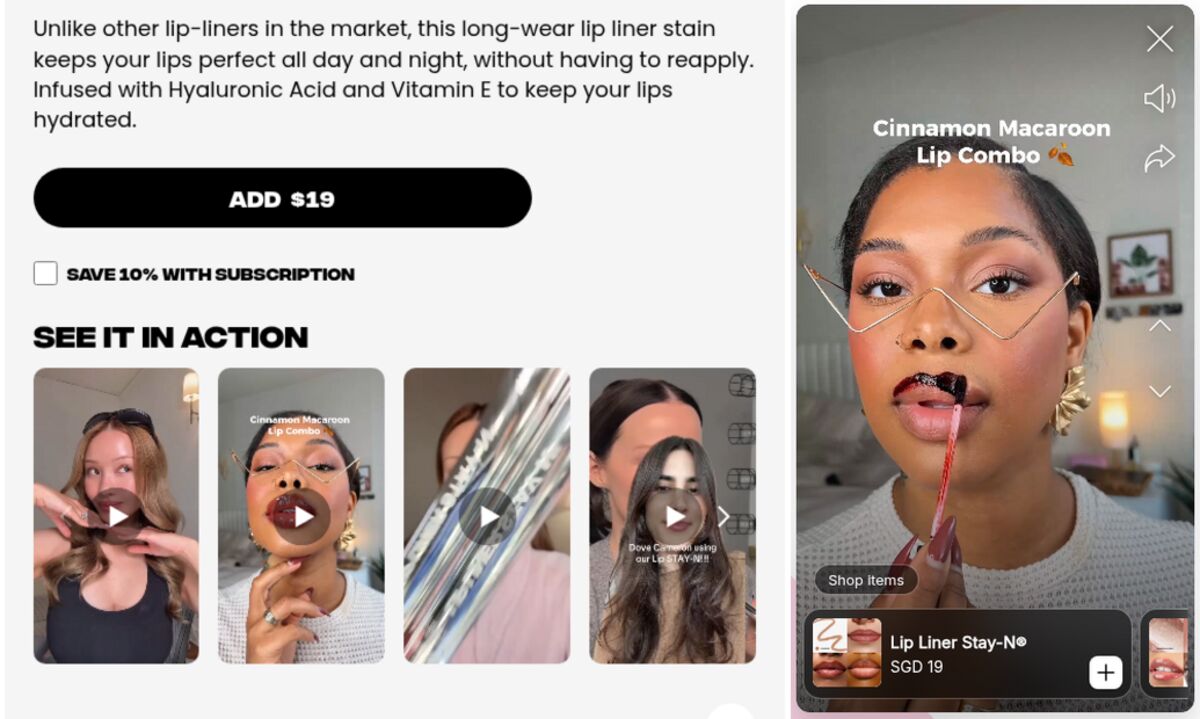
The video needs to be reachable from the top of the page, next to the gallery, where a shopper is still forming an opinion. A story bubble does this well because it takes almost no space: a circle with a cover image, and the full-screen experience is one tap away.
2. It carries a product card
While the video plays, the product it shows should be visible and tappable. Not a link in a description below. A card, on top of the video, with the product image, its name and its price.
This matters more than it sounds. The gap between "I want that" and "where do I click" is where most impulse gets lost. A card closes that gap to zero.
3. The price on the card is live
If the price shown in the video was typed in when the video was published, it will be wrong the first day you run a promotion, and it will stay wrong until someone remembers to update it. Shoppers notice, and a stale price undermines everything else on the page.
Read the price from the catalog at display time. It costs nothing and it removes an entire class of embarrassment.
4. It is short enough to finish
Nobody owes you ninety seconds. The videos that convert on a product page are the ones that get watched to the end, and on a storefront that means five to fifteen seconds per segment.
If your content genuinely needs a minute, split it into a sequence of short slides instead of one long clip. Each slide gets its own progress bar, the viewer can see how much is left, and the shopper who taps through fast still reaches your product card.
What to actually film
The useful test is: what does this product make people ask that a photo cannot answer?
- Scale. A backpack next to a laptop. A lamp next to a person. Anything where "how big is it really" is the blocker.
- Movement. How a fabric falls, how a hinge closes, how a chair rolls. Motion is the whole reason video exists.
- Assembly or use. The first two minutes of ownership, compressed into ten seconds. This removes the fear of a complicated product.
- Texture and finish. Close up, slow, well lit. It is the closest thing to touching the item.
- Proof of durability. The same item after two years. Nothing you can write competes with that shot.
Notice that none of these need a production budget. They need a phone, decent light, and a clear idea of the question being answered.
What to measure, and what to ignore
Ignore view counts on their own. A view means someone tapped once, and tells you nothing about whether the video did its job.
Watch three things instead:
- Completion rate, per video. This is your content quality signal. A video nobody finishes has a weak opening, or it is too long.
- Clicks on the product card, per video. This is your commercial signal. A video with a high completion rate and no clicks is entertaining and useless.
- The drop-off point, if you can see it. When most people leave at slide two, the fix is obvious and cheap.
One warning about attribution: do not try to prove that shoppable video "caused" a specific order. On a product page, too many elements share the credit. Compare completion and click rates between your own videos instead. That comparison is honest and it is enough to keep improving.
Start with one product
Before filming, look at how other Shopify stores place and tag their videos. Then pick the product that generates the most pre-sale questions, or the most returns for the wrong reason. Film the three or four shots that answer those questions. Put them in one short sequence at the top of the page, with a product card carrying a live price.
Then look at the completion rate a week later, and decide whether slide two needs rewriting.
Storiq does the mechanical part of this on Shopify: full-screen tappable stories on your product pages, media served from your own Shopify Files library, a product card with a price read live from your catalog, and per-story opens, completion and clicks. The Free plan is enough for a first test.
Frequently asked questions
What is shoppable video?
Any video where the viewer can act on what they see without leaving the video: a product card, a price, a link to the right variant. The distinction matters because a video with no path to purchase is content, not commerce.
Should product videos autoplay with sound?
Autoplay muted is fine and expected. Autoplay with sound is not: most browsers block it, and shoppers who are browsing at work or in public will close the tab rather than hunt for a mute button. Design your video so it works without sound, with captions where the words matter.
Does shoppable video work outside fashion?
Yes, and often better. Anything where scale, assembly, texture or usage is hard to judge from a photo benefits more than clothing does: furniture, tools, cosmetics, food, hobby equipment. The question the video answers is what matters, not the category.