Shoppable video examples: 8 Shopify stores, and what each one gets right or misses
We opened 8 Shopify stores that use shoppable video, clicked every player and noted where the video sits, how the shopper buys from it and what is missing. Five let you buy from inside the video. Three do not.
We opened 8 Shopify stores that run shoppable video on 18 September 2026, clicked every player and noted three things: where the video sits, how the shopper buys from it, and what is missing. Five of the eight let the shopper buy from inside the video. Three show the product and offer no way to buy it. All eight return Shopify's powered-by header, and we name the video app only when the page's code or a visible badge shows it.
The browser ran from Singapore, so some screenshots show prices in Singapore dollars. The stores' own currency settings set those prices.
| Store | Page | Format | Where it sits | How you buy from the video |
|---|---|---|---|---|
| Nomad the Label | Product | 2 video tiles | Under add to cart | Full buy panel with size and add to cart |
| Tushbaby | Product | Story bubbles | Under add to cart | Full buy panel with variants |
| Sacheu | Product | Video carousel | Under add to cart | Product card with a quick-add button |
| Hampden | Product | Single tile, story player | Below the description | Product card with a "Shop" button |
| Nish Hair | Product | Floating video bubble | Bottom-right corner | Product card with add to cart |
| Mylee | Product | Looping clip in the gallery | 5th gallery tile | Nothing |
| SNEAK Energy | Home page | UGC video grid | Under featured products | Nothing |
| My Jolie Candle | Home page | Brand stories | Mid-page | Nothing |
Buying without leaving the video: Nomad the Label and Tushbaby
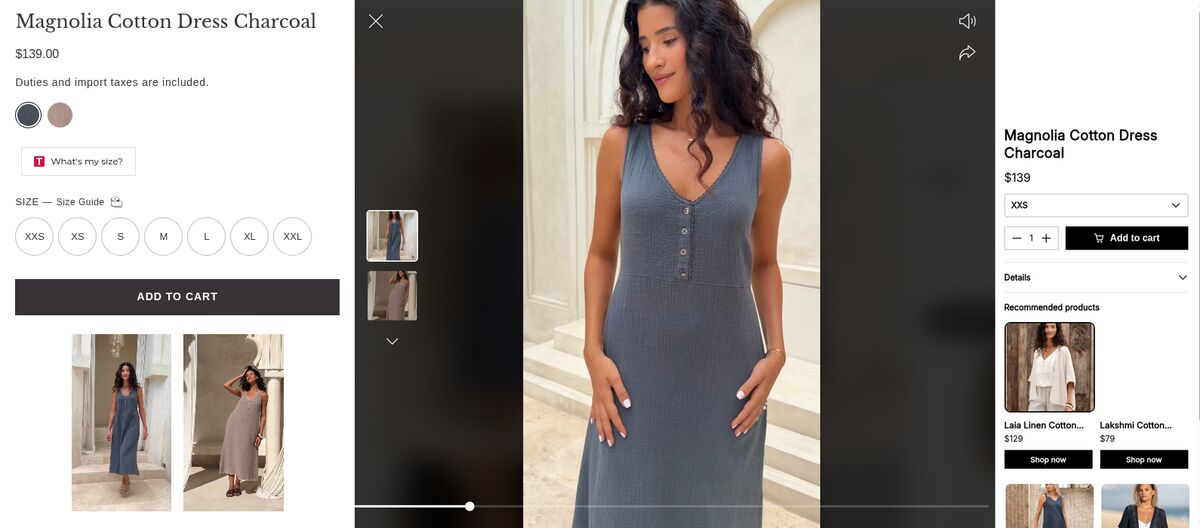
On Nomad the Label's Magnolia dress page, two video tiles sit right under the add to cart button, above the fold on a 1440 x 900 screen. Each shows the dress in one of its two colours. A click opens a full-screen player with a side panel: product name, $139, a size selector, quantity and an add to cart button. The shopper never leaves the video. The app is Videowise.
What is missing: the two clips, 13 and 14 seconds, are lookbook footage. Neither answers a question about fit or fabric, which is what a shopper hesitating on a dress wants to know.
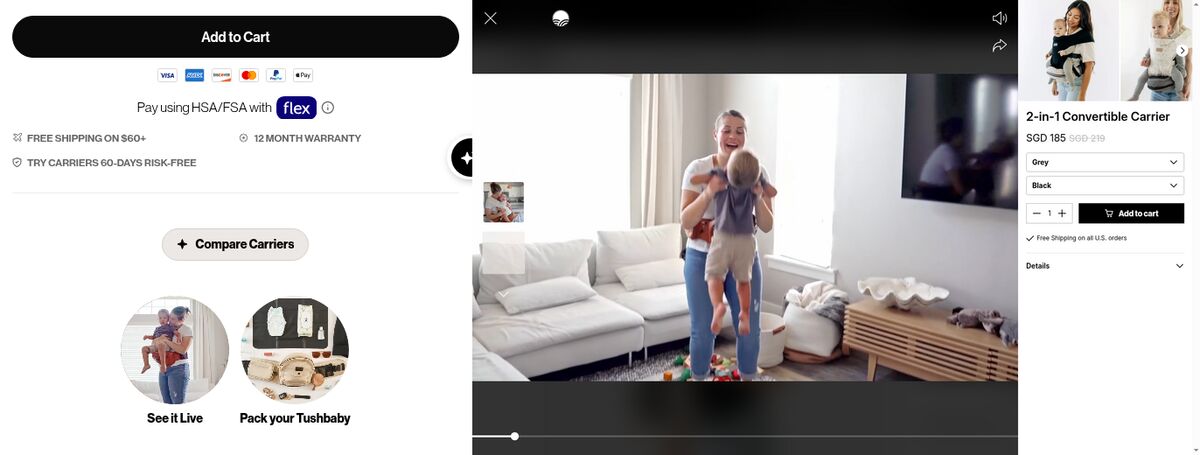
Tushbaby's carrier page uses the story format: two round bubbles labelled "See it Live" and "Pack your Tushbaby", under the add to cart button and the trust badges. The player works like Nomad's, with two colour selectors and add to cart in a side panel. The same video widget appears on 26 of the first 40 in-stock products checked, so the store treats video as a standard part of the page.
What is missing: the "See it Live" clip was shot in landscape and plays in a player built for vertical video, with wide black bars. The bubbles also sit just below the fold on desktop.
A product card in the player: Sacheu, Hampden and Nish Hair
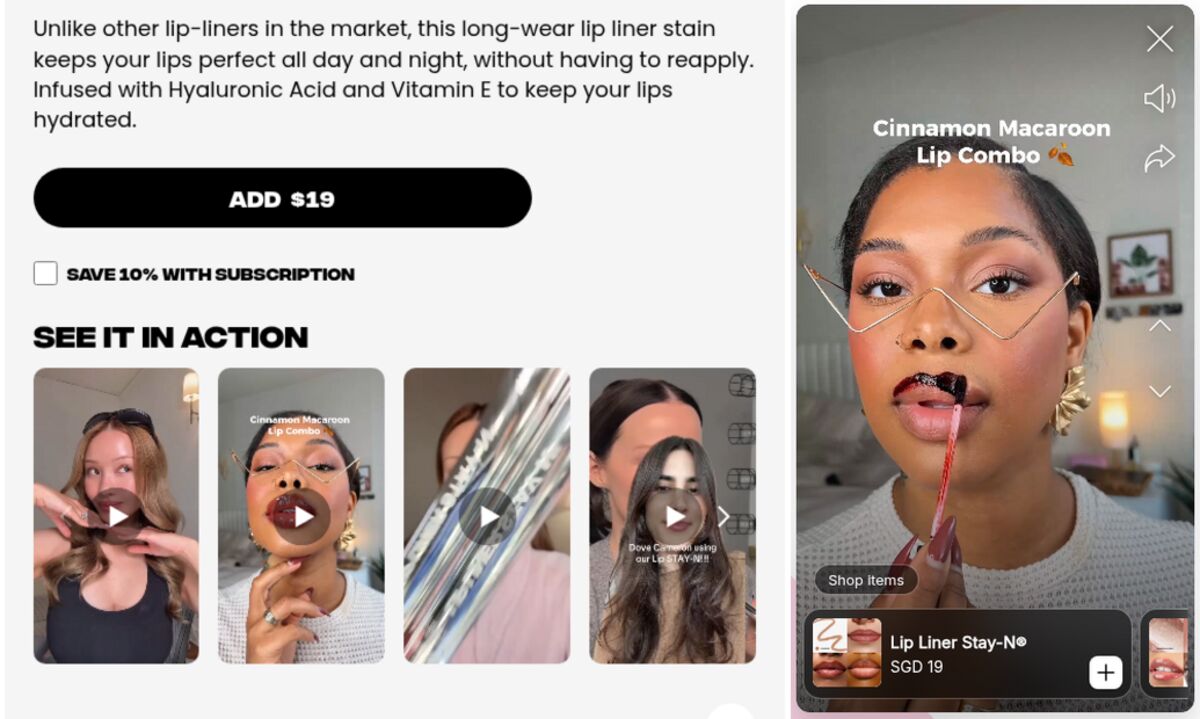
On Sacheu's lip liner page (cover image above), a "See it in action" carousel of five vertical clips sits under the add to cart button. Clicking one opens a player in the corner of the page, so the product page stays visible behind it. At the bottom, a product card shows the lip liner, its price and a "+" button to add it. A second card peeks from the side: one clip can tag several products. The clips run 11 to 27 seconds and play with sound after the click. The app is Videowise.
What is missing: the widget only shows on some products. Sacheu's Face Sculptor page loads the same empty container with no video in it.
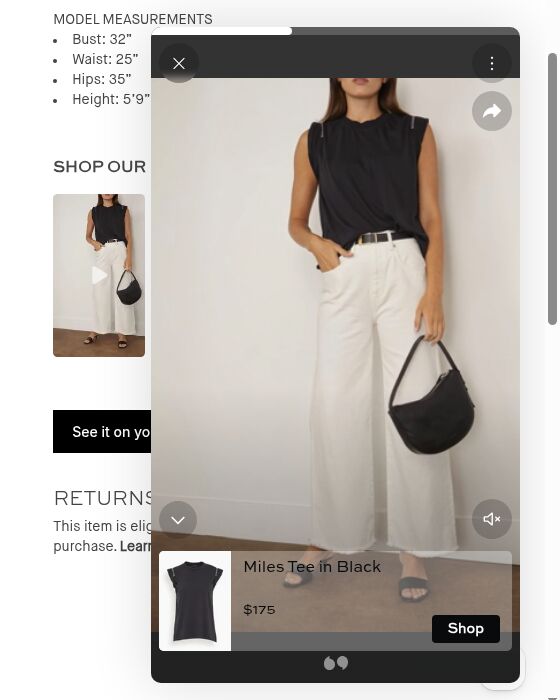
Hampden's Miles tee page shows one vertical tile under the heading "Shop our feed". The player looks like an Instagram story, with a segmented progress bar at the top, and ends on a product card with the tee, $175 and a "Shop" button. It opens muted. The app is Tolstoy.
What is missing: the tile sits below the description, fit details and model measurements, about 1,100 pixels down on desktop. The single clip is a model walking on, with no information a shopper could use.
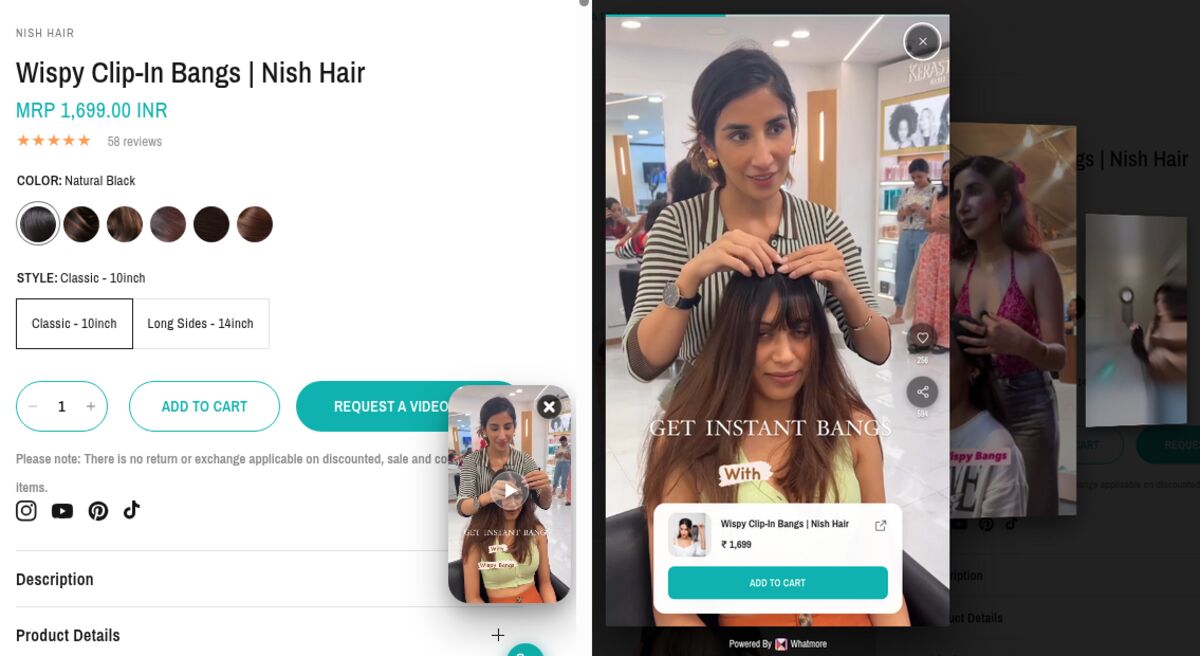
Nish Hair's clip-in bangs page uses a floating bubble fixed to the bottom-right corner, playing muted as soon as the page loads. It opens a centred story player with a product card and a full-width add to cart button. The page credits Whatmore under the player.
What is missing: on a 1440-pixel screen, the bubble covers part of the "Request a video call" button in the buy box. The page also has a native Shopify video deep in the gallery, about 2,800 pixels down, with no product tag.
Video with nothing to buy: Mylee, SNEAK Energy and My Jolie Candle
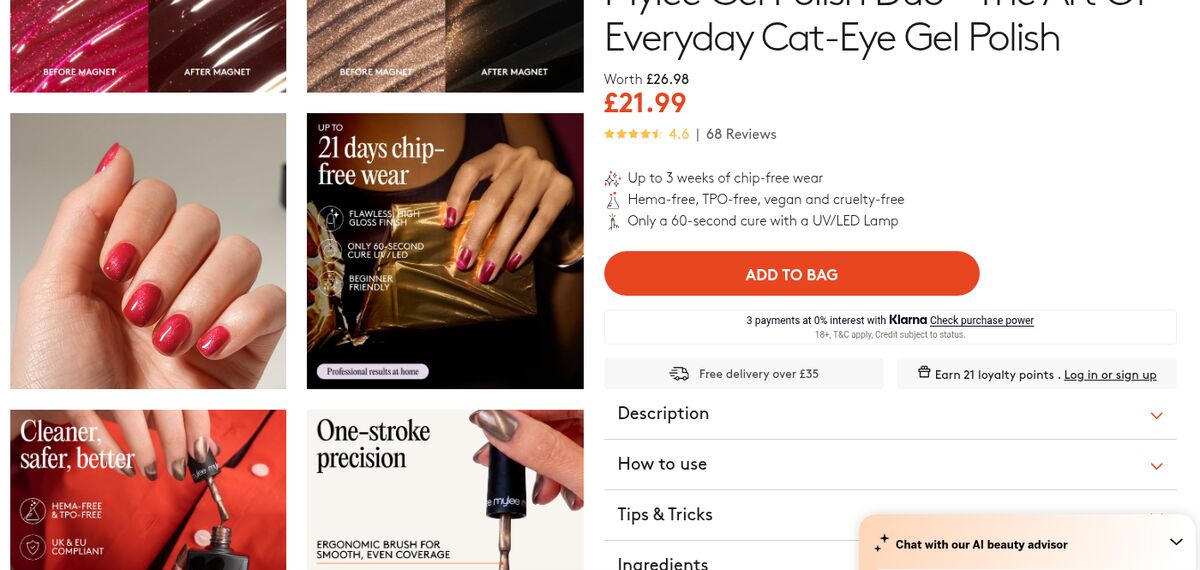
Mylee's cat-eye gel polish page places a 14-second muted loop as the fifth tile of its image grid, the same size as the photos. It has no play icon, no sound and no product card. It reads as a photo, and shoppers who miss the motion will not know it is a video.
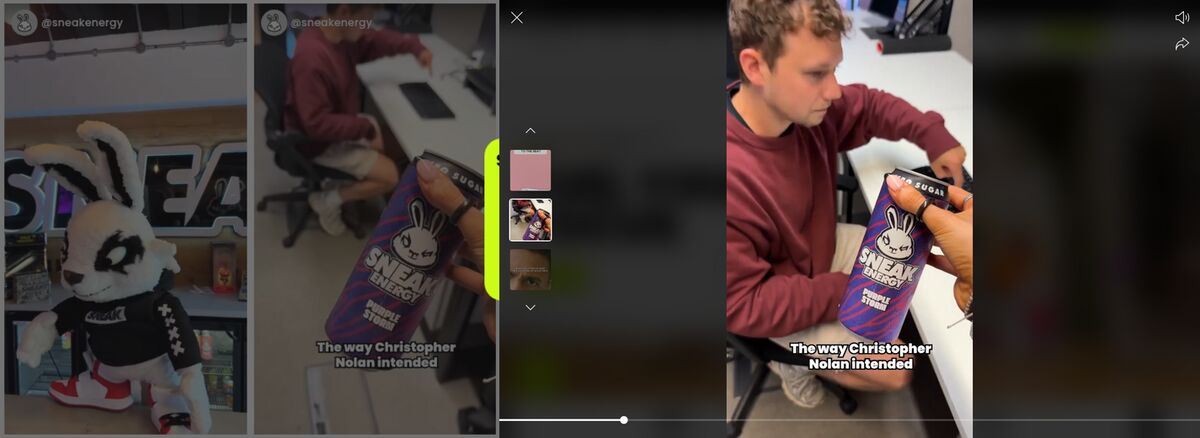
The SNEAK Energy home page runs a row of five creator clips. In the one we opened, the can is on screen for the whole clip, and the player offers sound and share buttons but no product card and no add to cart.
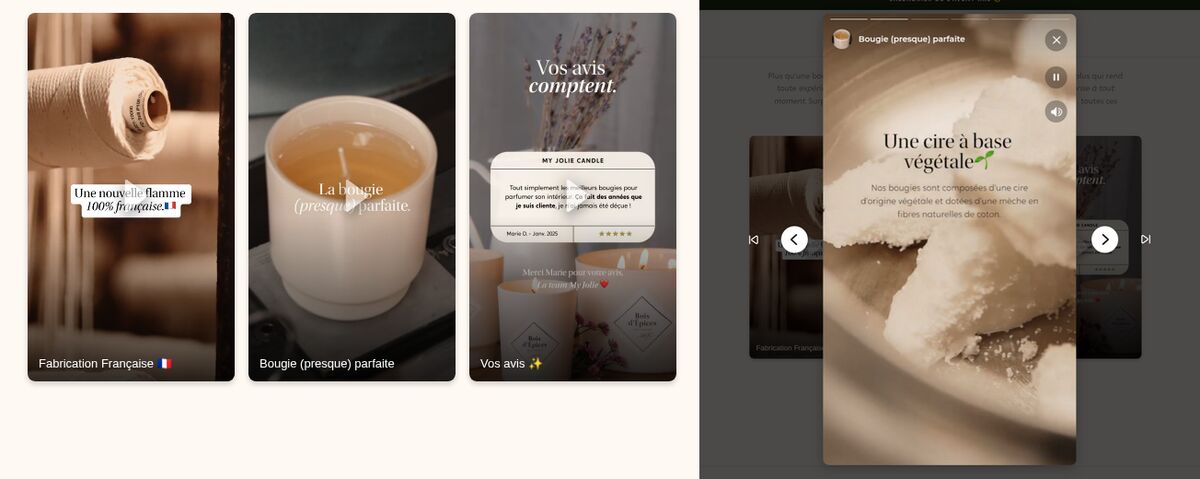
My Jolie Candle runs the most Instagram-like player of the eight, built with JOIN Stories: segmented progress bar, avatar, pause and sound buttons. The segments we viewed tell the brand's story, French manufacturing and plant-based wax, with no product attached. That is a valid choice for a home page. It is still a story that ends without a next step.
Patterns across the 8 stores
- Placement: three of the five product-page setups with a buy path sit directly under the add to cart button. The one placed below the description was the lowest on the page.
- Coverage is per product. Sacheu, Hampden and Skullcandy load a video app on product pages that show no video. A store running a video app does not mean every product has video.
- Sound: every preview plays muted. After a click, three players start with sound and two stay muted.
- Captions: none of the 8 players exposed a caption track. Some clips, such as Sacheu's and SNEAK's, carry text burned into the image instead.
- Popups: on 6 of the 8 pages, a popup (discount wheel, newsletter, cookie banner, country selector, chat) covered or competed with the video.
What to take for your own product page
- Put the video next to the buy button, where Nomad, Tushbaby and Sacheu put it, and keep it in the first screen.
- Attach the product to every clip that shows it. Three of these stores show the product and stop there.
- Film the answers to shoppers' questions: fit, texture, size in hand. Our article on shoppable video that converts lists what to film.
- Shoot vertical for a vertical player, and add on-screen text for shoppers watching muted.
- Check which products actually show video, and clear the popups from the first seconds of the visit.
For the definition and formats behind these examples, see what shoppable video is.
Storiq puts this format on Shopify product pages as full-screen stories added through a theme app block, using the videos in your Shopify Files library. On paid plans, each slide can carry a product card with the price read live from your catalog, and each story's opens, completion rate and clicks show in your dashboard.
Frequently asked questions
What is an example of a shoppable video?
On Nomad the Label's product page, two video tiles sit under the add to cart button. A click opens a full-screen player with a side panel showing the dress, its price, a size selector and an add to cart button, so the shopper buys without leaving the video.
What are examples of shoppable stories?
Tushbaby shows two round story bubbles on its baby carrier page, labelled 'See it Live' and 'Pack your Tushbaby'. Hampden and Nish Hair open their clips in a story-style player with a segmented progress bar and a product card at the bottom.
Where should a shoppable video go on a product page?
Three of the 8 stores we checked place it directly under the add to cart button, where it stays close to the purchase decision. A video placed below the description sat more than 1,000 pixels down the page on desktop, out of the first screen.